
Business Process Model and Notation (BPMN) is the global standard for visualizing business processes. While tasks, events, and participants form the backbone of any process diagram, gateways are the critical decision-making engines that give your process its logic and intelligence.
Represented by diamond shapes, gateways act as traffic controllers, dictating how a process splits into multiple paths (divergence) and how those paths merge back together (convergence). Without properly configured gateways, a process model is merely a linear list of tasks; with them, it becomes a dynamic map of real-world business rules, exceptions, and parallel activities.
This guide provides a comprehensive breakdown of the five primary BPMN gateway types, explaining when to use each one, how they behave during execution, and best practices for keeping your models clear, accurate, and executable.
![BPMN Cheat Sheet: Gateways [Diamonds]](https://www.visual-paradigm.com/servlet/editor-content/guide/a-comprehensive-overview-of-bpmn-part-i-gateways/sites/7/2026/07/downloaded-image.png)
The Exclusive Gateway is the most common decision point in BPMN. It is used when a process must choose exactly one path out of several alternatives based on specific data or business conditions.

Divergence (Splitting): The gateway evaluates conditions attached to each outgoing sequence flow. Only the first path whose condition evaluates to true is taken. All other paths are ignored.
Convergence (Merging): When used as a merge point, it simply allows the single active token from any incoming path to pass through to the next step. It does not wait for other paths because only one path was ever active.
Logic Base: Business Data (e.g., order amount, customer status, inventory level).
Mutually Exclusive: Only one path can be active at a time.
Process: Order Approval
An order is placed.
The Exclusive Gateway checks the Total Amount.
Path A: If Amount > $500, the flow goes to "Manager Approval."
Path B: If Amount ≤ $500, the flow goes to "Auto-Approve."
The process continues from whichever path was taken.
Best Practice: Always define a Default Flow (marked with a small slash on the sequence line) for the "else" case. This ensures the process doesn’t stall if none of the specific conditions are met due to unexpected data.
Unlike the data-based exclusive gateway, this node makes decisions based on which event occurs first, rather than evaluating data conditions. It is used exclusively for divergence.
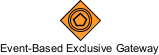
Waiting State: The process instance pauses at the gateway.
Race Condition: Multiple events are attached to outgoing flows (e.g., Message Received, Timer Expires, Signal Triggered).
First-Come-Wins: As soon as one of the connected events occurs, that path is taken, and all other waiting events are cancelled.
Logic Base: External Events (Time, Messages, Signals).
No Data Evaluation: Conditions are not checked; the occurrence of the event itself triggers the path.
Process: Customer Inquiry Response
A customer submits an inquiry.
The Event-Based Gateway waits.
Path A: If the customer "Receives Quote" (Message Event), move to Order Processing.
Path B: If the customer sends a "Cancel Request" (Message Event) within 24 hours, move to Process Termination.
Whichever message arrives first determines the next step.
The Parallel Gateway is used to create or synchronize concurrent flows without checking any conditions. It represents activities that happen simultaneously.

Divergence (Splitting): The incoming token is duplicated into multiple tokens, one for each outgoing path. All paths are activated immediately and run in parallel.
Convergence (Merging/Synchronization): The gateway acts as a barrier. It waits until all incoming parallel paths have arrived and completed their tasks. Only then does it release a single token to continue the process.
Logic Base: None (Automatic). No conditions are evaluated.
All-or-Nothing: In divergence, all paths start. In convergence, all paths must finish.
Process: New Employee Onboarding
HR confirms the hire.
The Parallel Gateway splits the flow into two simultaneous tasks:
Path A: IT Department prepares laptop and software access.
Path B: Facilities Team assigns office space and key card.
The Convergence Parallel Gateway waits for both IT and Facilities to mark their tasks as complete.
Once both are done, the process proceeds to "Employee First Day Orientation."
The Inclusive Gateway offers flexibility between the Exclusive and Parallel gateways. It allows for one or more paths to be activated based on business data.

Divergence (Splitting): The gateway evaluates conditions on all outgoing paths. Any path whose condition evaluates to true is activated. This could be one path, two paths, or all paths.
Convergence (Merging): The gateway waits for all active paths to complete. It knows which paths were activated at the split and will only proceed once those specific branches have finished.
Logic Base: Business Data.
Variable Activation: Unlike Exclusive (only one) or Parallel (all), Inclusive can trigger any combination of paths.
Process: Multi-Channel Marketing Campaign
A new promotion is launched.
The Inclusive Gateway checks customer preferences:
Path A: If Prefers Email is true, send Email.
Path B: If Prefers SMS is true, send SMS.
Path C: If Is VIP Customer is true, send Direct Mail.
A customer who prefers Email and is a VIP will trigger Path A and Path C simultaneously. A customer who only prefers SMS will trigger only Path B.
The convergence gateway waits for the specific channels triggered for that customer to complete before logging the campaign interaction.
The Complex Gateway is reserved for advanced logic that cannot be adequately modeled using the standard XOR, AND, or OR gateways. It should be used sparingly due to its complexity.

Divergence: Can split flows based on complex, non-standard rules.
Convergence: Uses a specific expression to determine when to proceed. For example, "Proceed when at least 3 out of 5 incoming paths have completed," or "Proceed when Path A and either Path B or Path C are complete."
Logic Base: Custom Expression.
High Complexity: Difficult for stakeholders to interpret without detailed documentation.
Process: High-Security Access Approval
A request for sensitive data access is submitted.
Three separate verification departments review the request: Security, Legal, and Compliance.
The Complex Gateway (Convergence) is configured with the rule: "Allow access if any two of the three departments approve."
If Security and Legal approve, the process continues, even if Compliance has not yet responded.
| Gateway Type | Symbol Hint | Primary Function | Logic Base | Activation Rule |
|---|---|---|---|---|
| Exclusive (XOR) | Empty Diamond | Choose exactly one path | Business Data | First true condition wins |
| Event-Based | Circle inside Diamond | Choose path by event | External Event | First event to occur wins |
| Parallel (AND) | Plus (+) inside | All paths simultaneously | None | All paths activate/complete |
| Inclusive (OR) | Circle (O) inside | One or more paths | Business Data | All true conditions activate |
| Complex | Asterisk (*) inside | Advanced custom logic | Custom Expression | Defined by complex expression |
To ensure your BPMN diagrams are professional, readable, and executable, follow these best practices:
If you use an Inclusive or Parallel gateway to split a process, you should generally use the same type of gateway to merge them. Mixing gateway types (e.g., splitting with Parallel and merging with Exclusive) can lead to "orphaned tokens" (process instances that never finish) or logical errors.
Never leave sequence flows unlabeled. Clearly label the outgoing paths from decision gateways with the condition being evaluated (e.g., "Amount > $500", "Customer = VIP", "Payment Failed"). This makes the process logic self-explanatory to anyone reading the diagram.
For Exclusive Gateways, always include a Default Flow (indicated by a small diagonal slash on the sequence line). This acts as a catch-all "else" condition, ensuring the process has a defined path even if no specific conditions are met due to unexpected or null data.
Follow the principle of simplicity. If you can model a process using an Exclusive or Parallel gateway, do so. Reserve the Complex Gateway for rare, truly intricate logic. Overuse of Complex Gateways makes diagrams difficult for business stakeholders to understand and hard for developers to implement.
Ask yourself: "Am I deciding based on information I already have (Data), or am I waiting for something to happen (Event)?"
If you have the data now → Use Exclusive or Inclusive.
If you are waiting for a message, timer, or signal → Use Event-Based.
Gateways are the brain of your BPMN process models. They transform static task lists into dynamic, intelligent workflows that reflect the reality of business operations. By mastering the distinctions between Exclusive (data-based choice), Event-Based (race condition), Parallel (simultaneous action), Inclusive (flexible multi-path), and Complex (advanced logic) gateways, you can create models that are not only visually clear but also logically sound.
Remember, the goal of BPMN is communication and clarity. While the Complex Gateway offers power, the Exclusive and Parallel gateways offer simplicity. Strive for the simplest gateway that accurately represents your business rule. With well-labeled flows, balanced splits and merges, and appropriate gateway selection, your process models will become powerful tools for analysis, automation, and continuous improvement.

