
In the fast-paced world of software development, documentation is often the first casualty. Architecture diagrams are drawn, shared, and then immediately forgotten as the codebase evolves. Within weeks, the documentation no longer matches the production environment, leading to confusion, onboarding delays, and costly architectural drift.
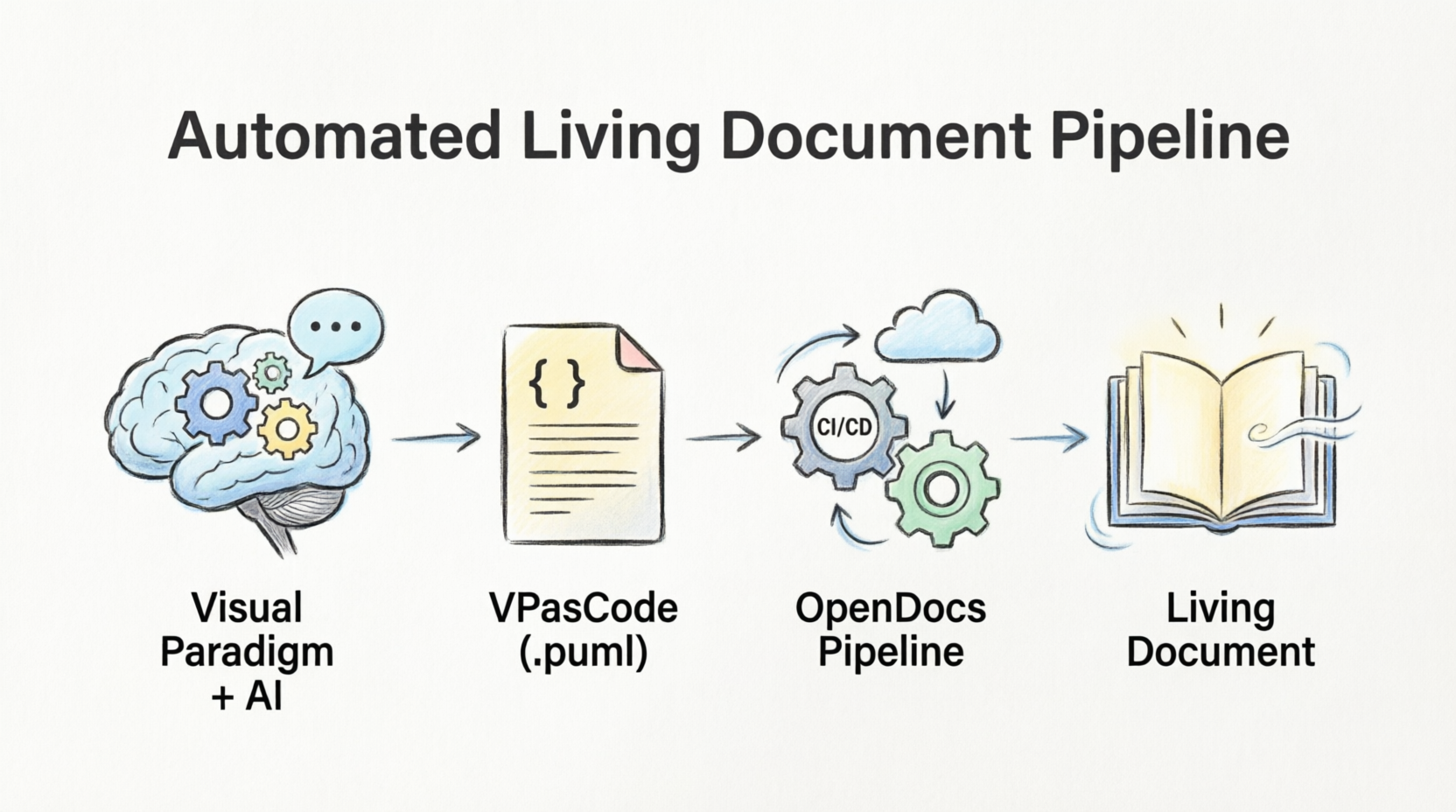
The solution lies in shifting our perspective: treating architecture diagrams not as static, manually maintained image files, but as text-defined layouts managed inside a central, easily updatable wiki. By combining the power of Visual Paradigm (VP), AI assistants, and OpenDocs, we can create a "Living Document" workspace. This guide will walk you through the philosophy, the tools, and the step-by-step process of building a documentation ecosystem that remains relevant and accessible alongside your codebase.
While there are many tools for drawing diagrams, Visual Paradigm's VPasCode stands out as the premier hub for the "Diagram as Code" methodology. It transforms Visual Paradigm from a simple drawing tool into a centralized, unified platform. Here is why VPasCode is the best choice for your visual designs:
The system streamlines documentation by keeping diagram definitions text-based, rendering them into high-fidelity graphics, and publishing them directly to your team's knowledge base:
[Visual Paradigm + AI] ➔ [VPasCode (.puml)] ➔ [OpenDocs Publishing] ➔ [Living Document]
Instead of manually clicking and dragging shapes, prompt an AI chatbot to generate your system architecture. Ask the AI specifically for PlantUML syntax to use in the VPasCode platform.
Example prompt: "Act as a software architect. Write PlantUML code for a microservices architecture that includes an API Gateway, an Auth Service, and a PostgreSQL database."
Visual Paradigm allows developers to manage diagrams directly through text formatting.
.puml extension.To make the documentation collaborative and "live," import the rendered diagrams from your VPasCode workspace:
Link the published OpenDocs pages directly within your internal wikis, team channels, or project dashboards. When your software architecture changes, simply update the raw text in VPasCode, export the refreshed model graphic, and update your OpenDocs page to instantly update the entire team's reference library.
You can render these code blocks using your VPasCode workspace editor, standard local IDE extensions, or any PlantUML-supported editor.
This diagram shows how a user interacts with a microservice architecture via an API Gateway.
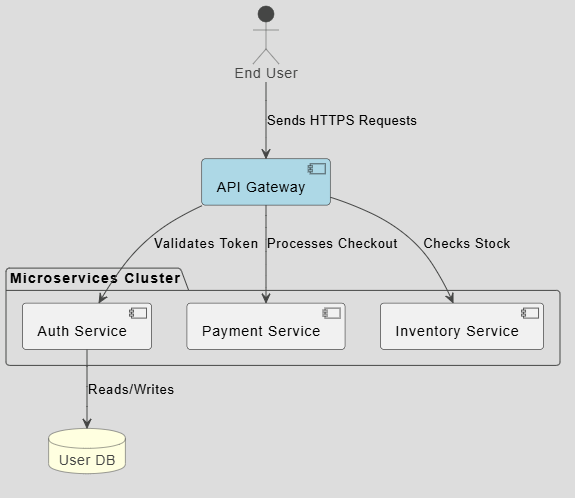
@startuml
!theme toy
skinparam componentStyle uml2

actor User as "End User"
component "API Gateway" as Gateway #LightBlue
database "User DB" as DB #LightYellow

package "Microservices Cluster" {
component "Auth Service" as Auth
component "Payment Service" as Payment
component "Inventory Service" as Inventory
}

User --> Gateway : Sends HTTPS Requests
Gateway --> Auth : Validates Token
Gateway --> Payment : Processes Checkout
Gateway --> Inventory : Checks Stock
Auth --> DB : Reads/Writes
@enduml
This diagram demonstrates the step-by-step messaging process during a user login request.
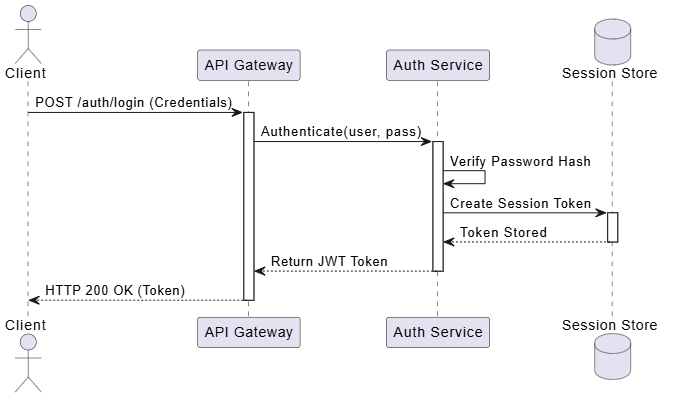
@startuml
actor Client
participant "API Gateway" as Gateway
participant "Auth Service" as Auth
database "Session Store" as Redis

Client -> Gateway : POST /auth/login (Credentials)
activate Gateway

Gateway -> Auth : Authenticate(user, pass)
activate Auth

Auth -> Auth : Verify Password Hash
Auth -> Redis : Create Session Token
activate Redis
Redis --> Auth : Token Stored
deactivate Redis

Auth --> Gateway : Return JWT Token
deactivate Auth

Gateway --> Client : HTTP 200 OK (Token)
deactivate Gateway
@enduml
Looking for a powerful, free diagram-as-code tool? Effortlessly render PlantUML, Mermaid, Graphviz, and 20+ programming languages in real time—powered by instant AI error fixing and automatic format detection.
.puml sources so it's always clear which text file belongs to which system layer.PaymentGateway) rather than vendor-specific details (e.g., Stripe_v3_Prod) within the diagram text to prevent your shared pages from aging prematurely.Outdated documentation is a solvable problem. By embracing the "Diagram as Code" philosophy through VPasCode, you transform your architecture layouts from static, decaying artifacts into structured text definitions. Leveraging Visual Paradigm's unified platform—complete with embedded AI, collaborative editing, and seamless publishing options via OpenDocs—ensures your entire organization can find, search, and align with your system architecture. Start small, model your first diagram, and watch your team's alignment soar as your knowledge base finally comes to life.

