
Enterprise architecture is inherently complex. To manage this complexity, architects rely on standardized modeling languages like ArchiMate to visualize, specify, and analyze the relationships between various business, application, and technology components. However, maintaining these diagrams using traditional drag-and-drop GUI tools can lead to version control nightmares and inconsistent styling.
Enter PlantUML. By treating architecture diagrams as code, PlantUML allows teams to version-control their models, automate diagram generation, and ensure strict adherence to ArchiMate standards.
This comprehensive guide breaks down the core concepts of ArchiMate relationships, maps them to their exact PlantUML code equivalents, and provides ready-to-use examples to help you master "Architecture as Code."
ArchiMate relationships describe how enterprise architecture elements interact, depend on each other, or structure one another. They are classified into four main categories:
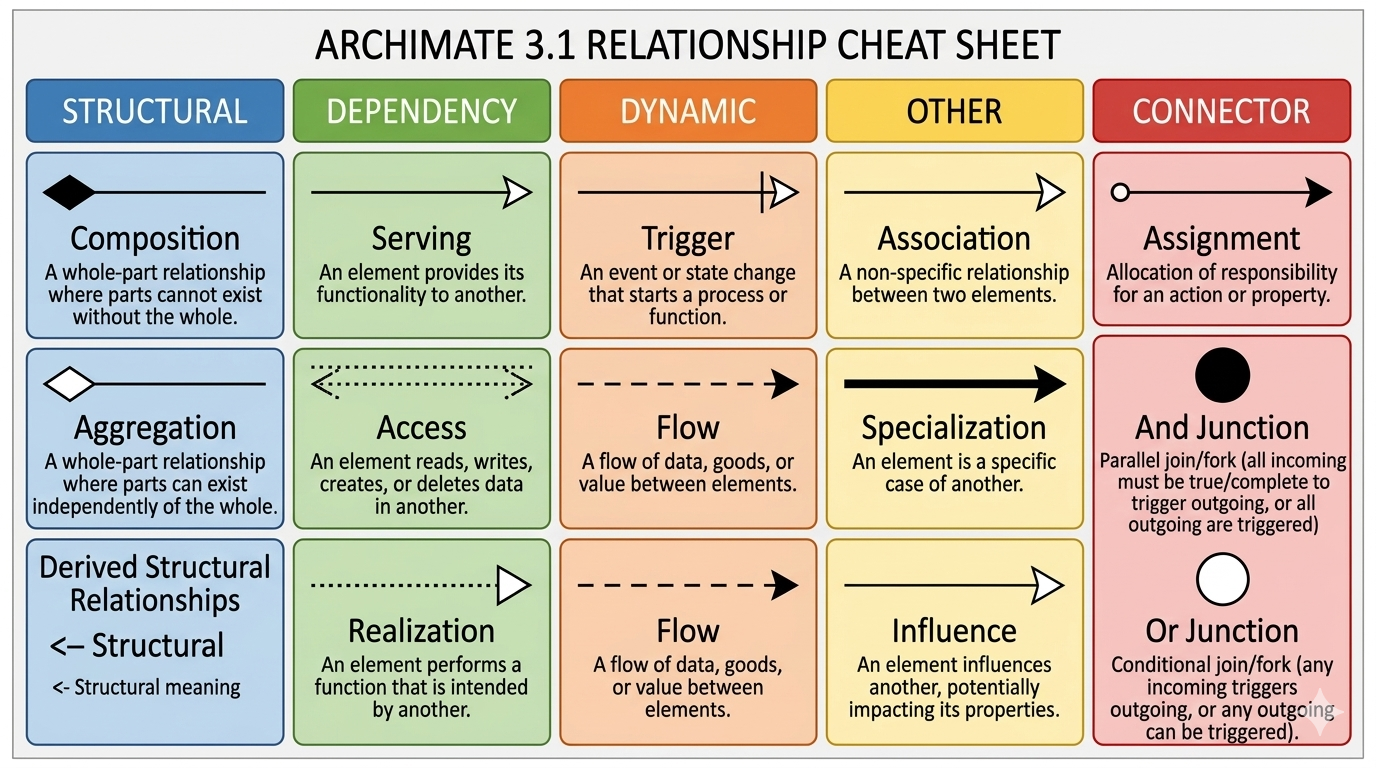
These relationships model the static, structural arrangement, composition, or assignment of enterprise concepts. They define the "anatomy" of your architecture.
These capture behavioral dependencies, service provisions, or interaction constraints between elements. They define how elements "use" or "affect" one another.
+ or negative -).These capture temporal paths, execution orders, or operational flows over time. They define the "physiology" or movement within your architecture.
These provide additional modeling flexibility and logical structuring.
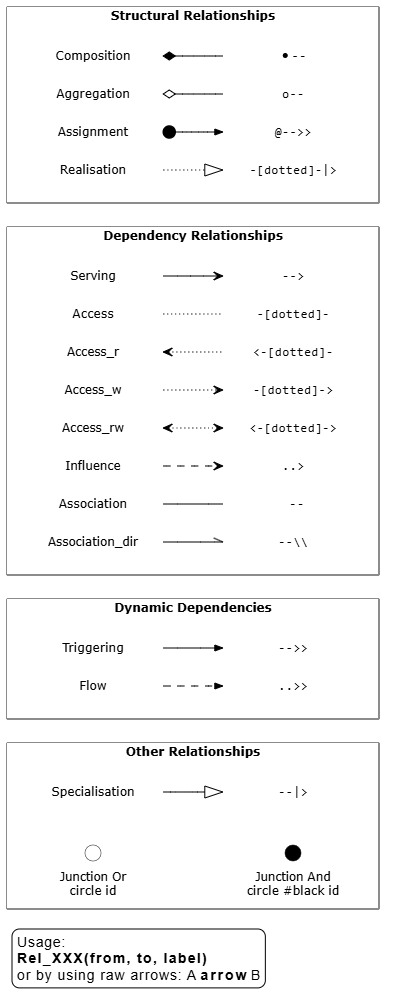
When writing ArchiMate diagrams as code, the standard layout utilizes the Official ArchiMate-PlantUML Library Extension macros. The script below maps the visual connectors to their exact PlantUML code representation, serving as a living reference diagram.
@startuml
' ==============================================================================
' ArchiMate Relationship Reference Diagram
' ==============================================================================
!global $ARCH_LOCAL = %false()
!global $ARCH_DEBUG = %false()

!if ($ARCH_LOCAL == %false())
    !include <archimate/Archimate>
    ' Optional themes (uncomment to apply):
    ' !theme archimate-alternate from <archimate/themes>
    ' !theme archimate-handwriting from <archimate/themes>
    ' !theme archimate-lowsaturation from <archimate/themes>
    ' !theme archimate-saturated from <archimate/themes>
    ' !theme archimate-standard from <archimate/themes>
!else
    ' Local testing includes
    !$LOCAL_FOLDER = "../dist/plantuml-stdlib/stdlib/archimate"
    !include $LOCAL_FOLDER/Archimate.puml
!endif

skinparam nodesep 4
left to right direction

' --- Helper Procedure for Drawing Relationships ---
!procedure Draw($name, $raw, $rawOverride="")
    !if ($rawOverride == "")
        !$showRaw = $raw
    !else
        !$showRaw = $rawOverride
    !endif
    label $name
    label "$showRaw" <<mono>> as a$name
    $name $raw a$name
!endprocedure

hide stereotype
<style>
.mono {
    FontName monospaced
}
</style>

legend left
Usage:
**Rel_XXX(from, to, label)**
or by using raw arrows: A **arrow** B
end legend

rectangle "Other Relationships" as other {
    circle "Junction Or\ncircle id" <<junction>> as c1
    circle #black "Junction And\ncircle #black id" <<junction>> as c2
    c1 -[hidden]- c2
    Draw(Specialisation, "--|>")
}

rectangle "Dynamic Dependencies" as dynamic {
    Draw(Flow, "..>>")
    Draw(Triggering, "-->>")
}

rectangle "Dependency Relationships" as dependency {
    Draw(Association_dir, "--\\", "--\\\\")
    Draw(Association, " --")
    Draw(Influence, "..>")
    Draw(Access_rw, "<-[dotted]->")
    Draw(Access_w, "-[dotted]->")
    Draw(Access_r, "<-[dotted]-")
    Draw(Access, "-[dotted]-")
    Draw(Serving, "-->")
}

rectangle "Structural Relationships" as structural {
    Draw(Realisation, "-[dotted]-|>")
    Draw(Assignment, "@-->>")
    Draw(Aggregation, "o--")
    Draw(Composition, "*--")
}
@enduml
💡 Pro-Tip for Layout Control: You can control the layout orientation of your relationships inside the macros by appending directional suffixes such as _Up, _Down, _Left, or _Right (e.g., Rel_Realization_Up(gateway, paymentSrv)).
Below are two practical examples demonstrating how to implement these concepts in PlantUML.
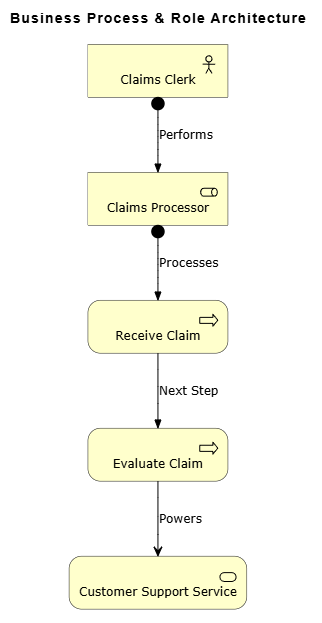
This script models a Business Actor assigned to a Role, triggering a sequence of internal processes that ultimately serve a final Customer. It highlights Structural (Assignment) and Dynamic (Triggering, Serving) relationships.
@startuml
!include <archimate/Archimate>

title Business Process & Role Architecture

' ==============================================================================
' Elements Definition
' ==============================================================================
Business_Actor(actor, "Claims Clerk")
Business_Role(role, "Claims Processor")
Business_Process(proc1, "Receive Claim")
Business_Process(proc2, "Evaluate Claim")
Business_Service(srv, "Customer Support Service")

' ==============================================================================
' Relationships Implementation
' ==============================================================================
Rel_Assignment(actor, role, "Performs")
Rel_Assignment(role, proc1, "Processes")
Rel_Triggering(proc1, proc2, "Next Step")
Rel_Serving(proc2, srv, "Powers")

@enduml
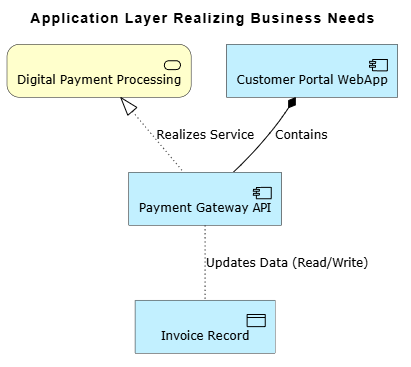
A core strength of ArchiMate is its ability to show how lower layers support higher layers. This script displays how functional application components interact via data objects to realize business-level components, utilizing Structural (Composition), Dependency (Access), and Realization relationships.
@startuml
!include <archimate/Archimate>

title Application Layer Realizing Business Needs

' ==============================================================================
' Business Layer
' ==============================================================================
Business_Service(paymentSrv, "Digital Payment Processing")

' ==============================================================================
' Application Layer
' ==============================================================================
Application_Component(portal, "Customer Portal WebApp")
Application_Component(gateway, "Payment Gateway API")
Application_DataObject(invoice, "Invoice Record")

' ==============================================================================
' Relationships Implementation
' ==============================================================================
Rel_Composition(portal, gateway, "Contains")

' Note: Use the standard Rel_Access macro.
' The Read/Write context is provided in the label.
Rel_Access(gateway, invoice, "Updates Data (Read/Write)")

Rel_Realization_Up(gateway, paymentSrv, "Realizes Service")

@enduml
Mastering ArchiMate relationships is essential for creating clear, unambiguous, and actionable enterprise architecture models. By transitioning from traditional drawing tools to PlantUML, architects can unlock the benefits of "Architecture as Code"—including seamless version control, automated CI/CD pipeline integration, and strictly enforced visual consistency.
Whether you are mapping out high-level business processes or detailing cross-layer application realizations, understanding the distinction between structural, dependency, and dynamic relationships ensures your diagrams accurately reflect the true nature of your enterprise. Use the matrix and examples provided in this guide as a foundational reference to elevate your architectural documentation and drive better alignment across your organization.

