In the world of Business Process Model and Notation (BPMN), most modeling focuses on the forward momentum of a process: Step A leads to Step B, which leads to Step C. But what happens when Step C reveals that Step A should never have happened?
Standard error handling in BPMN is designed to deal with failures during execution—preventing a task from finishing or routing around a broken path. However, it lacks the mechanism to reverse work that has already been successfully completed. This is where Compensation comes in.
Compensation is the specialized BPMN notation for "undoing" or "rolling back" transformations that have already occurred. It is the digital equivalent of a refund, a cancellation, or a reversal entry in accounting. Whether you are canceling a booked flight, reversing a bank transfer, or voiding an approved bonus, compensation ensures that your process maintains data integrity and business logic consistency, even when things go wrong after the fact.
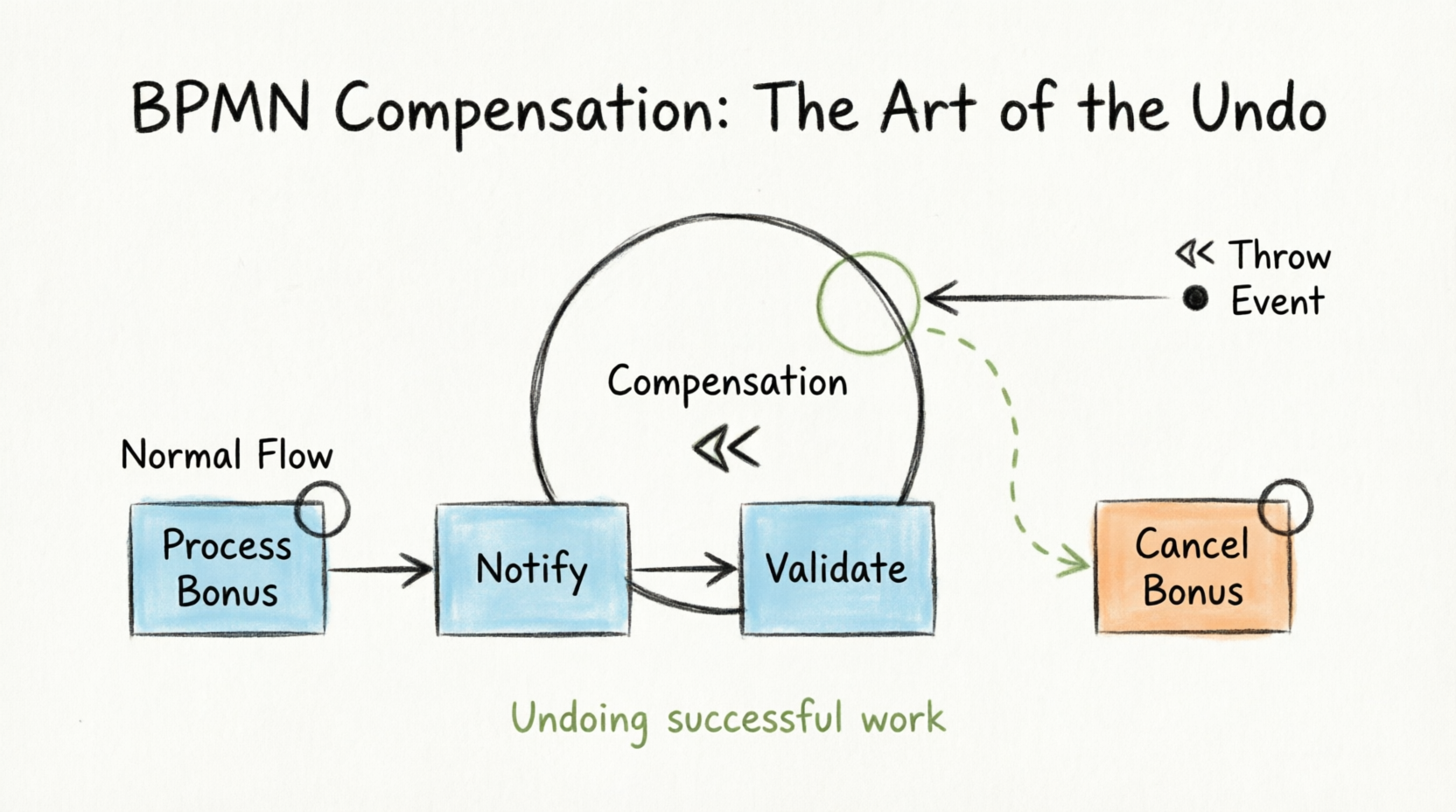
This guide explores the mechanics, visual notations, and best practices for implementing compensation in your BPMN diagrams, ensuring your processes are not just efficient, but resilient.
Part 1: Core Concepts and Mechanics
1. The Philosophy of Compensation
Unlike error events, which interrupt a flow because something failed, compensation events are triggered because something succeeded but later became invalid.
- Error Handling: "The credit card was declined, so we cannot ship the item." (Prevention)
- Compensation: "The item was shipped and delivered, but the customer returned it, so we must refund the payment." (Reversal)
2. The "Throw and Catch" Mechanism
Compensation operates on a decoupled trigger system known as "Throw and Catch." This allows the rollback logic to be separated from the main process flow until explicitly needed.
The Thrower (Trigger)
- Symbol: Intermediate Throwing Compensation Event (a double triangle inside a circle, filled in dark/black).
- Function: This event is placed in the main process flow where the decision to undo previous work is made. When the process token reaches this event, it "throws" a compensation signal.
- Behavior: It does not continue down the normal sequence flow. Instead, it searches for any active "Catchers" associated with previously completed activities.
The Catcher (Receiver)
- Symbol: Boundary Compensation Event (a double triangle inside a circle, attached to the boundary of an activity).
- Function: This event is attached to the specific activity (Task or Subprocess) that needs to be undone.
- Behavior: During normal process execution, this event is ignored. The process token flows past the activity without activating the boundary event. It only "wakes up" if a corresponding Thrower activates it.
3. Associations vs. Sequence Flows
A critical distinction in BPMN compensation is how the catcher connects to the actual undo logic.
- Standard Flow: Uses solid lines with arrows (Sequence Flows) to dictate order.
- Compensation Flow: Uses dotted lines with open arrows (Associations).
- You cannot use a sequence flow to connect a Boundary Compensation Event to its compensation task.
- The Association indicates that "If this boundary event is triggered, execute the linked compensation task."
Part 2: Visual Notations and Modeling Rules
To correctly model compensation, you must recognize and apply specific visual markers.
1. The Compensation Marker
Any activity (Task, Subprocess, or Call Activity) that is designed to perform the undo action must be marked with the Compensation Marker.
- Visual: Two triangles pointing to the left
<< inside the activity box.
- Meaning: This tells the process engine and human readers that this task is not part of the standard forward flow but exists solely to reverse a previous state.
2. The Event Icon
Both Throwing and Catching Compensation Events use the same internal icon:
- Visual: Two triangles pointing to the left
<< inside the event circle.
- Differentiation:
- Throwing: The circle border is thick/filled (or the icon is filled, depending on the tool standard).
- Catching: The circle border is thin/standard.
3. Exception to Standard Modeling Rules
In standard BPMN, every Intermediate Event must have one incoming and one outgoing Sequence Flow.
- Compensation Exception: Intermediate Throwing Compensation Events do not require an outgoing Sequence Flow. Once they throw the signal, their job is done. They effectively terminate the current branch of the process or trigger a global rollback, depending on the scope.
Part 3: Practical Examples
Understanding compensation is best achieved through real-world scenarios. Here are three distinct examples ranging from simple to complex.
Example 1: HR Yearly Performance Review (The Classic Case)
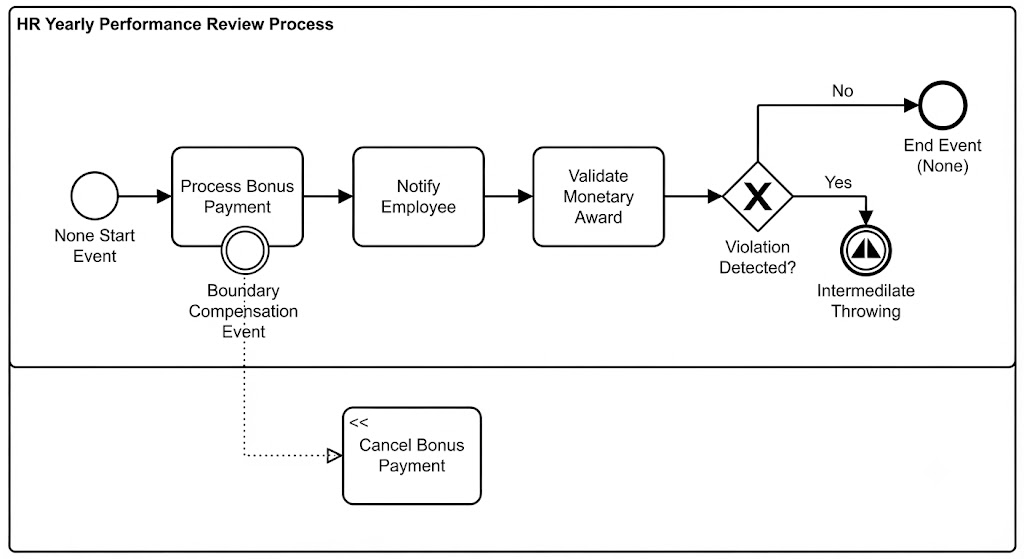
Context: An employee receives a bonus, but a later audit reveals a policy violation.
- Normal Flow:
- Task:
Process Bonus Payment (Completed successfully).
- Task:
Notify Employee.
- Task:
Validate Monetary Award.
- The Exception:
- During
Validate Monetary Award, the system detects an "Employee Violation."
- The Trigger:
- The flow moves to an Intermediate Throwing Compensation Event labeled
Bonus Invalid.
- The Rollback:
- The Thrower activates the Boundary Compensation Event attached to
Process Bonus Payment.
- Via an Association, the process executes the Task:
Cancel Bonus Payment (marked with the << compensation marker).
- Result: The money is withdrawn from the employee’s account, effectively undoing the original transaction.
Example 2: E-Commerce Order Fulfillment
Context: A customer orders a custom-made item. The item is manufactured, but the payment fails during the final capture stage.
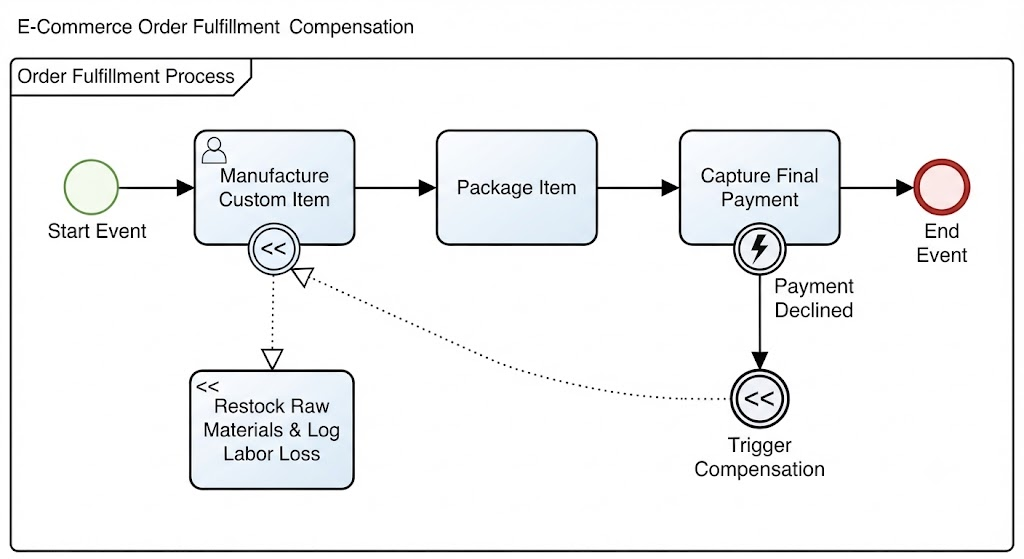
- Normal Flow:
- Task:
Manufacture Custom Item (Completed; inventory reduced, labor spent).
- Task:
Package Item.
- Task:
Capture Final Payment.
- The Exception:
Capture Final Payment returns a "Declined" error.
- The Trigger:
- An Error Boundary Event on
Capture Final Payment catches the decline and routes to a Throwing Compensation Event.
- The Rollback:
- The Thrower targets the Boundary Compensation Event on
Manufacture Custom Item.
- The Compensation Task
Restock Raw Materials and Log Labor Loss is executed.
- Result: The system acknowledges the loss of labor but restores raw material inventory levels, keeping stock counts accurate.
Example 3: Travel Booking Agency
Context: A user books a Flight, Hotel, and Car Rental as a bundle. The Flight books successfully, but the Hotel is out of stock.
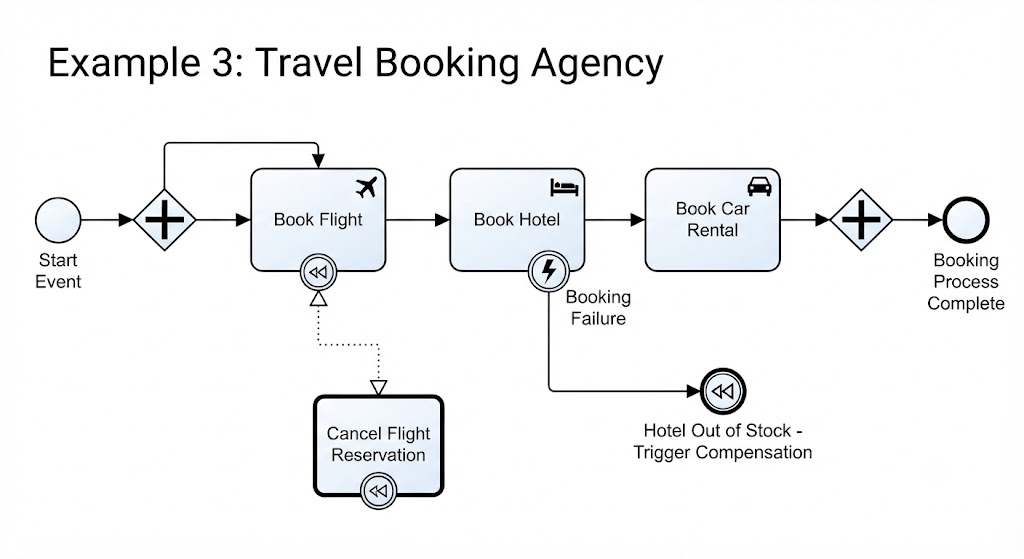
- Normal Flow:
- Task:
Book Flight (Success).
- Task:
Book Hotel (Failure).
- The Trigger:
- The failure in
Book Hotel triggers a Throwing Compensation Event.
- The Rollback:
- The Thrower activates the Compensation Boundary on
Book Flight.
- Compensation Task:
Cancel Flight Reservation is executed.
- Result: The user is not left with a standalone flight booking they didn't want. The entire bundle is rolled back to allow for re-selection or cancellation.
Part 4: Compensation in Transactions
Compensation is frequently used within Transaction Subprocesses.
- Visual: A Subprocess with a double-lined border.
- Concept: A transaction represents a set of activities that must all succeed together. If any part fails, the entire transaction is aborted.
- Mechanism:
- If a Transaction Subprocess is canceled (via a Cancel End Event or an error), the BPMN engine automatically triggers compensation for all completed activities within that transaction scope.
- You do not need to manually place Throwers for every step; the Transaction container handles the orchestration of rollbacks for any activity that has a Compensation Boundary Event defined.
Best Use Case: Financial transfers, multi-step reservations, or any scenario where partial completion creates a inconsistent state.
Part 5: Best Practices for Modeling Compensation
To ensure your BPMN diagrams are clear, maintainable, and executable, follow these guidelines:
1. Keep Compensation Tasks Atomic
- Do: Create specific, single-purpose tasks for compensation (e.g.,
Refund Credit Card, Void Invoice).
- Don't: Try to reuse the original task logic. The logic to create an invoice is different from the logic to void one.
2. Use Clear Naming Conventions
- Prefix or suffix compensation tasks to distinguish them from normal tasks.
- Example:
Process Order vs. Compensate: Cancel Order.
- Label Throwing Events clearly to indicate why the rollback is happening (e.g.,
Payment Failed, Policy Violation).
3. Limit the Scope
- Only attach Compensation Boundary Events to activities that actually need to be undone.
- Do not attach compensation to read-only tasks (e.g.,
Send Notification) unless sending a "Cancellation Notification" is strictly required. Often, it is better to let the notification stand and simply reverse the financial/data impact.
4. Avoid Over-Complication
- If a process step can be easily reversed by a simple database update, consider whether a full BPMN compensation task is necessary.
- For complex rollbacks involving multiple systems, use a Compensation Subprocess (a collapsed subprocess with the
<< marker) to encapsulate the complex undo logic.
5. Document the "Why"
- Since compensation paths are invisible during normal execution, they are often overlooked during reviews. Use annotations to explain under what conditions the compensation will trigger.
Conclusion
Compensation in BPMN is more than just a technical notation; it is a reflection of real-world business resilience. In any robust organization, mistakes happen, payments fail, and policies change. A process model that only accounts for the "happy path" is incomplete and dangerous.
By mastering the "Throw and Catch" mechanism, utilizing associations correctly, and applying compensation within transactions, you create process models that are not only accurate representations of ideal workflows but also robust maps for handling reality’s inevitable exceptions.
Remember: The goal of compensation is not just to stop the process, but to restore the system to a valid, consistent state—as if the error had never occurred. When modeled correctly, compensation ensures that your business processes remain trustworthy, auditable, and reliable, no matter what twists and turns they encounter.


