
Imagine trying to build a skyscraper using only a spreadsheet of materials and a verbal agreement between the architect and the construction crew. It would be chaotic, expensive, and likely collapse. Yet, in software development, we often jump straight into writing code with nothing more than a few Jira tickets and a Slack message.
Enter the Unified Modeling Language (UML). Despite the rise of rapid development frameworks, UML remains the universal visual language of software engineering. It is the bridge between abstract business requirements and concrete code. For beginners, UML can look like a confusing alphabet of boxes and arrows, but it is actually a highly logical tool designed to make complex systems understandable.
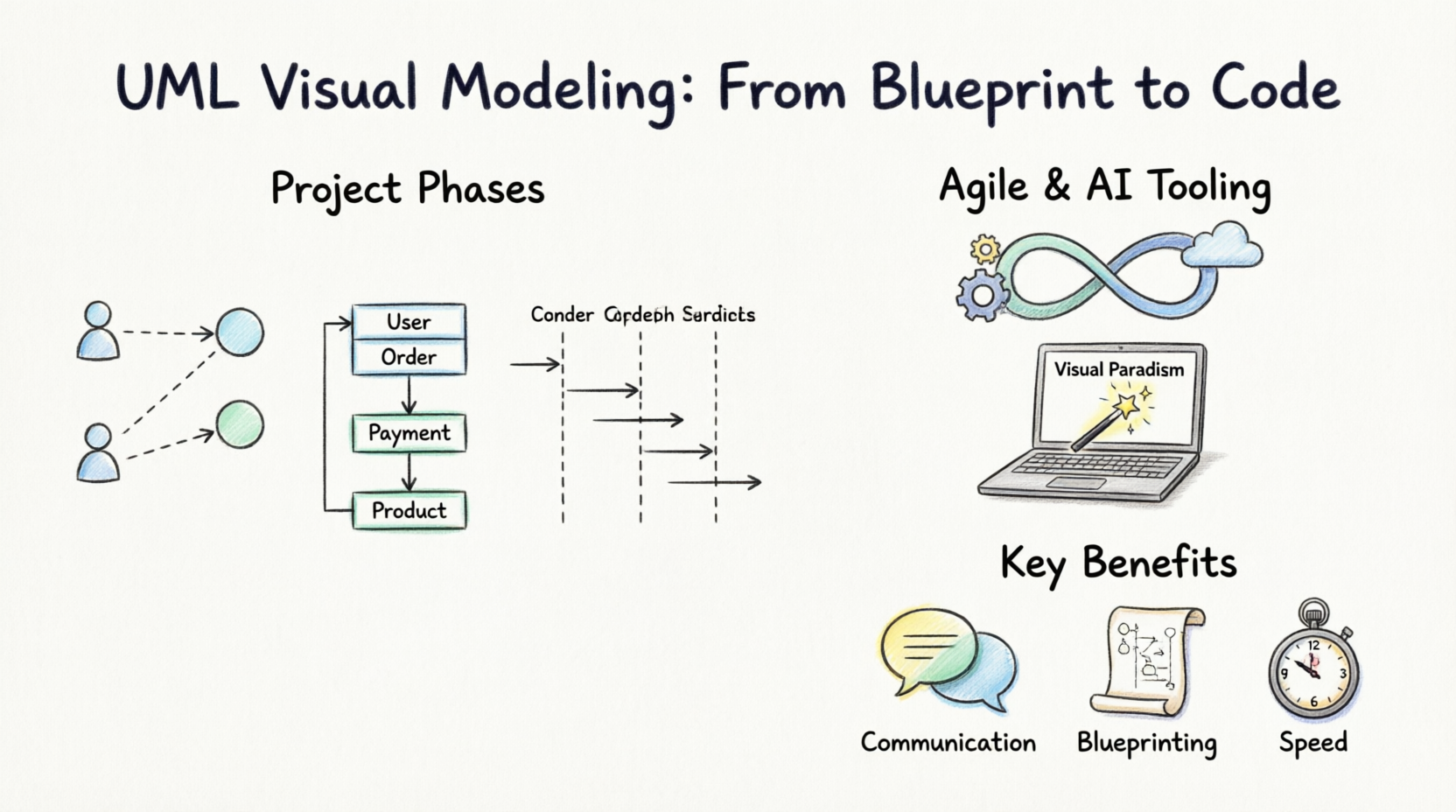
This comprehensive tutorial will demystify UML, guiding you from your first basic diagram to integrating visual modeling into modern Agile workflows. Whether you are a junior developer, a product manager, or a computer science student, this guide will equip you with the skills to design better software.
At its core, UML is not a programming language; it is a visual modeling language. Standardized by the Object Management Group (OMG), it provides a standard way to visualize the design of a system.
To keep things simple for beginners, UML diagrams are broadly divided into two main categories:
These diagrams show the static, physical, or conceptual parts of a system. They represent the "things" in your software.
These diagrams show the dynamic behavior of the system, how objects interact, and how states change over time.
Beginner Tip: You don’t need to memorize all 14 UML diagram types. Mastering just three—Use Case, Class, and Sequence—will allow you to model 90% of everyday software architecture.
Why take the time to draw diagrams when you could just write code? Here are seven compelling reasons:
Different phases of a project require different levels of detail. Here is how to choose the right diagram, complete with PlantUML examples.
(Note: PlantUML is a fantastic "diagrams-as-code" tool. You can render the code blocks below using any online PlantUML renderer).
When to use: At the very beginning of a project to define the scope and understand user interactions.
What it shows: Actors (users/external systems) and Use Cases (features/goals).
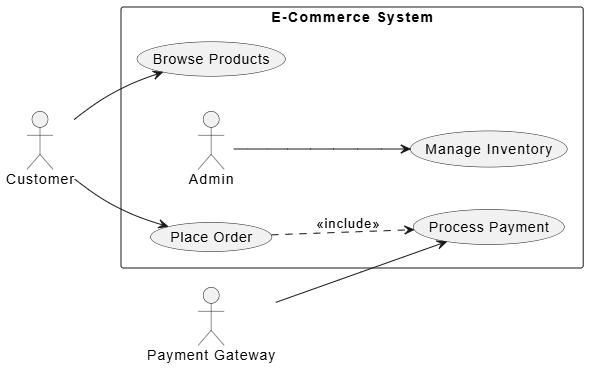
@startuml
left to right direction
skinparam packageStyle rectangle

actor "Customer" as customer
actor "Payment Gateway" as gateway

rectangle "E-Commerce System" {
  usecase "Browse Products" as UC1
  usecase "Place Order" as UC2
  usecase "Process Payment" as UC3
  usecase "Manage Inventory" as UC4

  customer --> UC1
  customer --> UC2
  UC2 ..> UC3 : <<include>>
  gateway --> UC3

  actor "Admin" as admin
  admin --> UC4
}
@enduml
When to use: During the design phase to map out the database schema, object-oriented structure, and API models.
What it shows: Classes, attributes, methods, and relationships (inheritance, composition, association).
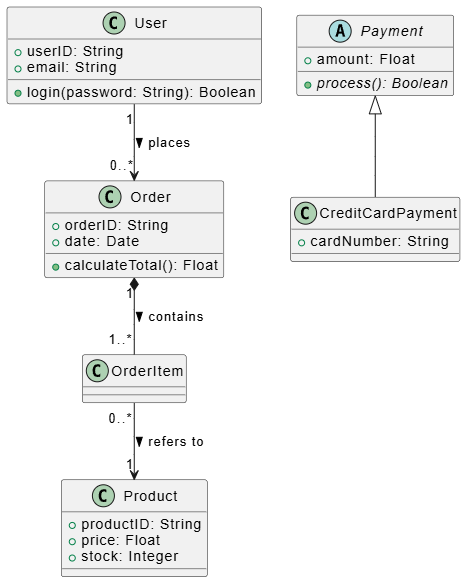
@startuml
class User {
  + userID: String
  + email: String
  + login(password: String): Boolean
}

class Order {
  + orderID: String
  + date: Date
  + calculateTotal(): Float
}

class Product {
  + productID: String
  + price: Float
  + stock: Integer
}

User "1" --> "0..*" Order : places >
Order "1" *-- "1..*" OrderItem : contains >
OrderItem "0..*" --> "1" Product : refers to >

abstract class Payment {
  + amount: Float
  + {abstract} process(): Boolean
}

class CreditCardPayment extends Payment {
  + cardNumber: String
}
@enduml
When to use: When designing complex API calls, microservice interactions, or tricky business logic flows.
What it shows: The chronological sequence of messages passed between objects.
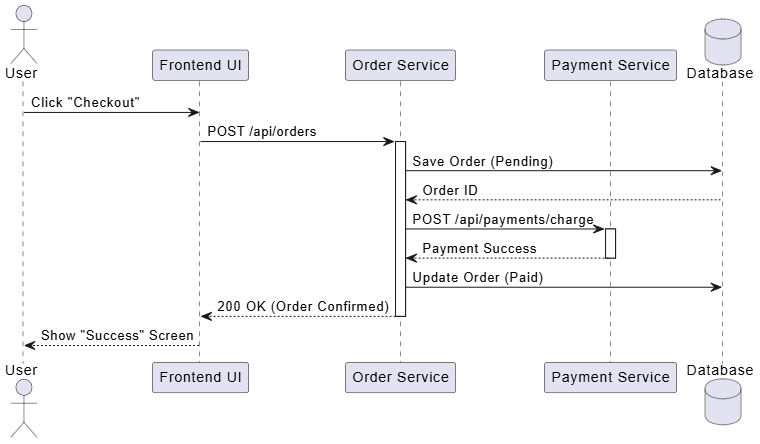
@startuml
actor User
participant "Frontend UI" as UI
participant "Order Service" as OS
participant "Payment Service" as PS
database "Database" as DB

User -> UI : Click "Checkout"
UI -> OS : POST /api/orders
activate OS

OS -> DB : Save Order (Pending)
DB --> OS : Order ID

OS -> PS : POST /api/payments/charge
activate PS
PS --> OS : Payment Success
deactivate PS

OS -> DB : Update Order (Paid)
OS --> UI : 200 OK (Order Confirmed)
deactivate OS

UI --> User : Show "Success" Screen
@enduml
A common myth is that UML is a "Waterfall" tool that slows down Agile teams. In reality, modern UML thrives in Agile and DevOps when applied correctly through Agile Modeling.
While "diagrams-as-code" (PlantUML) is great for developers, visual drag-and-drop tools are often better for collaborative design and quick brainstorming.
For beginners and enterprise teams alike, Visual Paradigm is highly recommended. It offers a robust, intuitive interface that supports all 14 UML diagram types.
Why Visual Paradigm stands out for modern teams:
UML is not about rigid rules or creating perfect, academic artwork; it is about clarity. By taking the time to visually model your software, you are forcing yourself to think through the logic, edge cases, and architecture before committing to code.
As you transition from a beginner to an advanced practitioner, remember that UML is a tool in your toolkit, not a religion. Use the diagrams that provide value to your specific project phase, leverage modern AI-powered tools like Visual Paradigm to speed up your workflow, and integrate your models seamlessly into your Agile pipelines.
Mastering UML will not only make you a better coder; it will make you a better communicator, a sharper architect, and an invaluable asset to any software development team. Grab your favorite modeling tool, sketch out your next idea, and watch your software designs come to life.

