
In the world of business process management, clarity is currency. Business Process Model and Notation (BPMN) has emerged as the global standard for visualizing these processes, offering a universal language that bridges the gap between technical developers, business analysts, and executive stakeholders. However, even seasoned modelers often stumble over one of BPMN’s most deceptively simple visual elements: swimlanes.
At first glance, Pools and Lanes appear identical—rectangular containers that organize activities on a canvas. Yet, conflating the two leads to models that are not only technically invalid but also misleading regarding organizational boundaries and accountability. A misplaced sequence flow or an incorrectly defined boundary can turn a clear workflow into a confusing web of contradictions.
This guide serves as a definitive resource for distinguishing between Pools (the containers of independent participants) and Lanes (the internal partitions of responsibility). By mastering the specific rules governing each, you will learn to create BPMN diagrams that accurately reflect legal entities, clarify role-based handoffs, and ensure strict adherence to BPMN 2.0 standards. Whether you are mapping a simple internal approval workflow or a complex multi-party supply chain, understanding the architecture of swimlanes is the key to effective process communication.
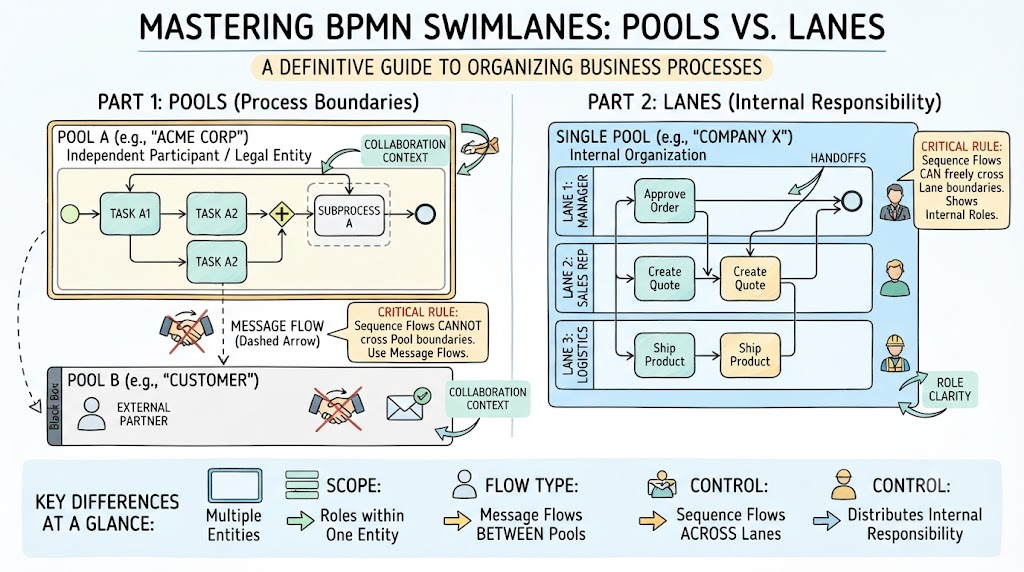
A Pool represents a major participant in a business process collaboration. In BPMN terminology, a participant is typically a distinct legal entity, an independent organization, a separate department acting as an autonomous unit, or an external partner.
Conceptually, think of a pool as an independent "stage" or "organization." It assumes total control over the activities contained within its boundary. If an entity can send and receive messages independently, it likely deserves its own pool.
The Hard Process Boundary:
A pool defines the absolute limit of a process owned by that specific participant.
The Golden Rule: Sequence flows (solid arrows with solid heads) cannot cross pool boundaries. Sequence flows represent the order of execution within a single process. If an activity in Pool A triggers an activity in Pool B, you must use a Message Flow (dashed line with an open circle head). This distinction is critical for maintaining logical validity.
Visualization Modes:
White Box Pool: This view reveals the internal mechanics of the participant’s process, including tasks, gateways, events, and sequence flows. Use this when you need to document or analyze the internal workings of that specific entity.
Black Box Pool: This view hides all internal details, displaying only the pool’s name. Use this to represent external entities (e.g., a customer, a government regulator, or a third-party vendor) where their internal processes are unknown, proprietary, or irrelevant to your specific analysis.
Collaboration Context:
Pools are the primary building blocks of Collaboration Diagrams. These diagrams illustrate how multiple independent participants interact to achieve a shared goal.
A single BPMN diagram can contain multiple pools to map end-to-end cross-organizational workflows, such as order-to-cash or procure-to-pay.
Scenario: E-Commerce Order Fulfillment
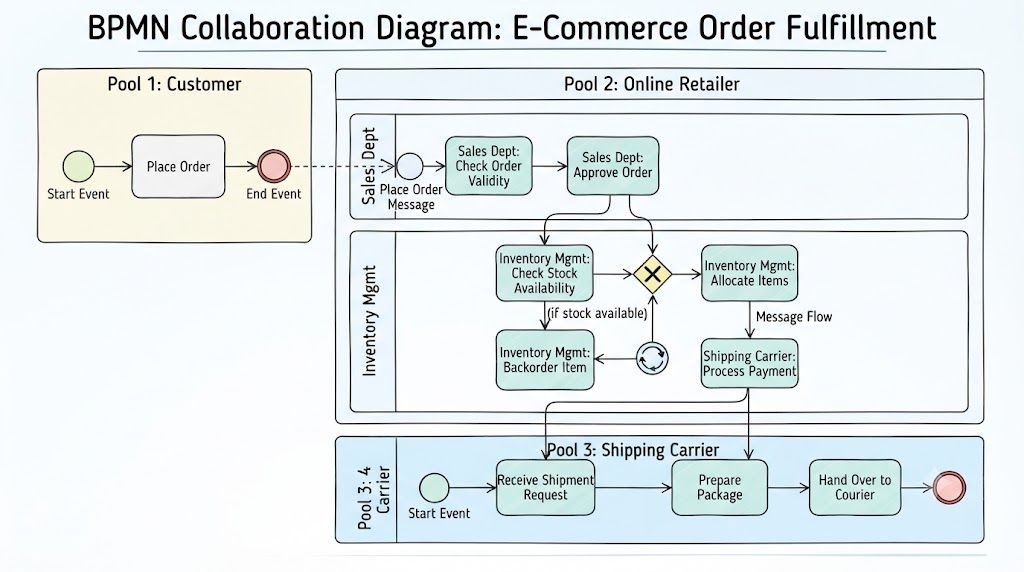
Pool 1: Customer (Initiates the purchase)
Pool 2: Online Retailer (Processes payment, manages inventory)
Pool 3: Shipping Carrier (Executes delivery)
Interaction: The Customer sends a "Place Order" message to the Retailer. The Retailer sends a "Ship Item" message to the Carrier. Note that no solid arrow connects the Customer directly to the Carrier.
Scenario: Loan Application Processing
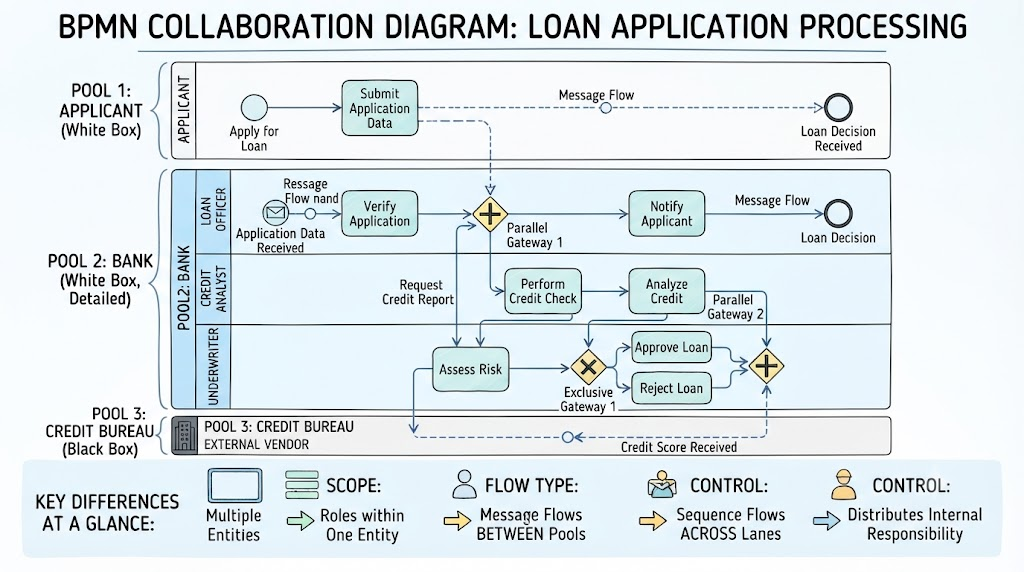
Pool 1: Applicant
Pool 2: Bank
Pool 3: Credit Bureau
Interaction: The Applicant submits data to the Bank. The Bank requests a credit check from the Credit Bureau via message flow. The Bureau returns the score via message flow.
A Lane is a sub-partition within a Pool. It is used to organize and categorize activities by identifying who or what is performing the work within that participant’s process.
Lanes do not define process boundaries; they define responsibility distribution. They help answer the question: "Within this organization, which role is responsible for this step?"
Assignment and Role Focus:
Lanes typically represent roles (e.g., Manager, Clerk, Developer), systems (e.g., CRM System, ERP), or functional departments (e.g., HR, Finance).
Best Practice: Use stable functional roles rather than specific job titles or transient department names. Organizational charts change frequently; "Approver" is a more stable and reusable label than "VP of Sales North America."
Flow Flexibility:
The Critical Distinction: Sequence flows CAN cross lane boundaries freely within the same pool. This illustrates how work is handed off from one role to another within the same organization.
Example: A task in the "Sales Rep" lane can have a direct sequence flow leading to a decision gateway in the "Manager" lane. This indicates an internal handoff, not an external message exchange.
Nesting Capability:
Lanes can be nested to provide granular detail. You might have a main lane for "Engineering Department" with sub-lanes for "Frontend Team," "Backend Team," and "QA Team." However, use nesting sparingly to avoid visual clutter.
Scenario: Internal Expense Approval (Within the "Company" Pool)
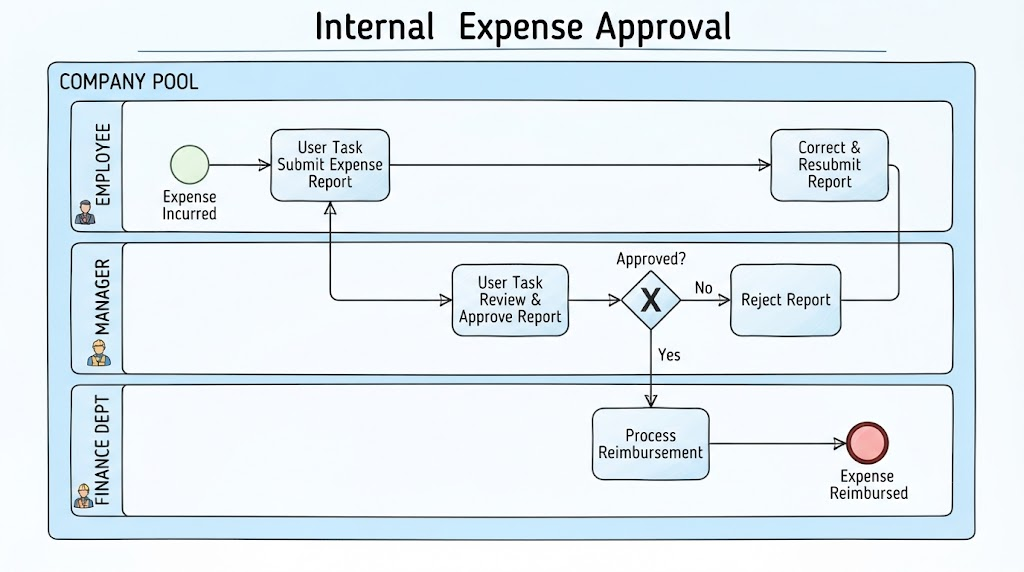
Lane 1: Employee (Submits expense report)
Lane 2: Manager (Reviews and approves/rejects)
Lane 3: Finance Dept (Processes reimbursement)
Flow: Sequence flows move logically from Employee → Manager → Finance. All activities remain within the single "Company" pool.
Scenario: Software Bug Fix Lifecycle (Within the "Tech Corp" Pool)
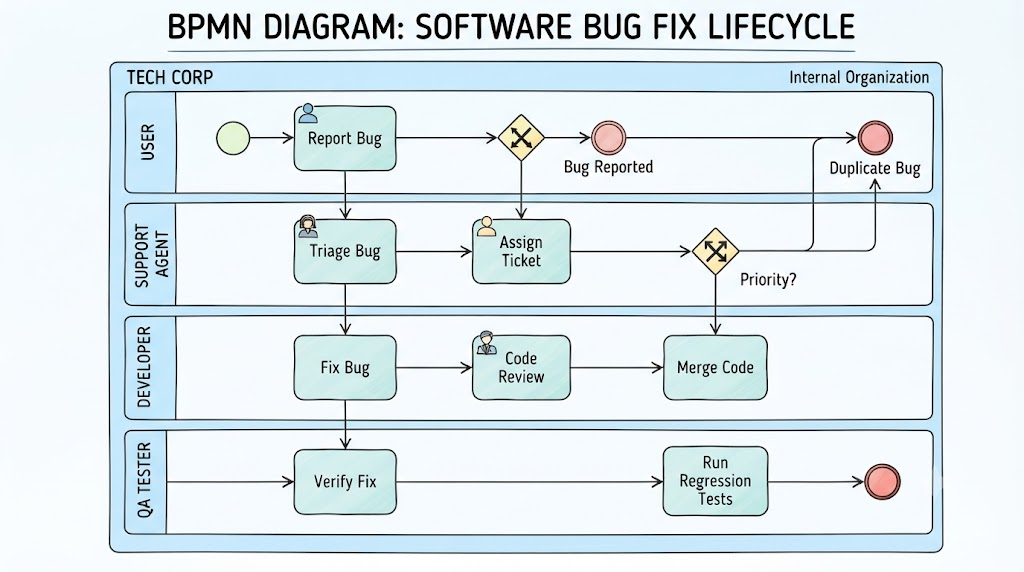
Lane 1: User (Reports bug)
Lane 2: Support Agent (Triage and assign)
Lane 3: Developer (Fixes code)
Lane 4: QA Tester (Verifies fix)
Flow: Sequence flows connect tasks across these lanes as the ticket moves through its lifecycle, demonstrating internal collaboration.
To ensure you are using the correct container, refer to this comparative summary:
| Feature | Pool | Lane |
|---|---|---|
| Represents | A major participant/entity (e.g., "Amazon," "Customer," "Bank"). | A specific role, system, or department within that entity (e.g., "Warehouse Rep," "CRM System"). |
| Control Level | Defines the process boundary and total control for that participant. | Organizes the internal distribution of tasks and responsibilities. |
| Sequence Flows | CANNOT cross pool boundaries. Use Message Flows instead. | CAN cross lane boundaries freely within the same pool. |
| Message Flows | Used to communicate between pools. | Not typically used for lane-to-lane communication (use sequence flows). |
| Hierarchy | Top-level container in a collaboration diagram. | Nested partition inside a pool. |
| Visibility | Can be White Box (detailed) or Black Box (hidden). | Always shows internal activities assigned to that role. |
Choosing between a Pool and a Lane is often the most challenging part of BPMN modeling. Use this decision framework to guide your choices.
Multiple Organizations are Involved: You are modeling a process that spans different companies, legal entities, or external partners.
Clear Ownership Boundaries Exist: You need to explicitly show where one party’s responsibility ends and another’s begins.
Message Exchange is Key: The interaction between participants is driven by formal messages (emails, API calls, signed documents) rather than direct physical or digital handoffs.
External Entities are Involved: You want to represent a customer, supplier, or regulator whose internal processes are not part of your model (use a Black Box pool).
Internal Process Mapping: You are documenting a process entirely within one organization, department, or team.
Role Clarity is Needed: You want to highlight which specific role (person, team, or automated system) performs each task.
Handoffs Occur Within the Same Entity: Work passes from one employee/department to another within the same company structure.
System Interaction is Internal: You want to show how a user interacts with a software system within the same organizational boundary.
Using Separate Pools for Internal Departments: Do not create separate pools for "Sales" and "Marketing" if they are part of the same company. This implies they are legally distinct entities communicating via formal messages. Instead, use one pool named "Company" with two lanes: "Sales" and "Marketing." Reserve separate pools for legally distinct entities with formal message-based interactions.
To ensure your diagrams are professional, maintainable, and easy to interpret, adhere to these best practices:
Strict Naming Conventions:
Pools: Label with the Participant’s Name (e.g., "Acme Corp," "Customer," "Payment Gateway").
Lanes: Label with Specific Functional Roles (e.g., "Product Owner," "Developer," "QA Engineer") or Systems (e.g., "SAP ERP," "Salesforce"). Avoid vague names like "Team 1" or "Group A."
Prioritize Stable Roles:
Avoid using department names (e.g., "HR Department") or specific job titles (e.g., "John Smith") if possible. Departments reorganize, and people leave. Use functional roles (e.g., "Recruiter," "Hiring Manager") to keep your model relevant longer.
Respect Lane Boundaries:
Modeling Violation: An activity (task, subprocess) should never straddle two lanes. Each task must belong entirely to one lane. If a task involves multiple roles, break it down into smaller, discrete tasks or assign it to the primary owner.
Limit Lane Depth and Complexity:
While nesting lanes is possible, avoid excessive nesting (more than 2–3 levels) as it can make the diagram cluttered and hard to read. Consider simplifying the view or creating a separate sub-process diagram if too much detail is required.
Maintain Consistent Flow Direction:
Maintain a consistent left-to-right or top-to-bottom flow within lanes. Avoid zig-zagging sequence flows across lanes unnecessarily, as this reduces readability.
Utilize Black Boxes for External Parties:
If you don’t know or don’t need to show the internal process of an external partner, use a Black Box pool. This keeps the diagram focused on your organization’s responsibilities and reduces cognitive load for the viewer.
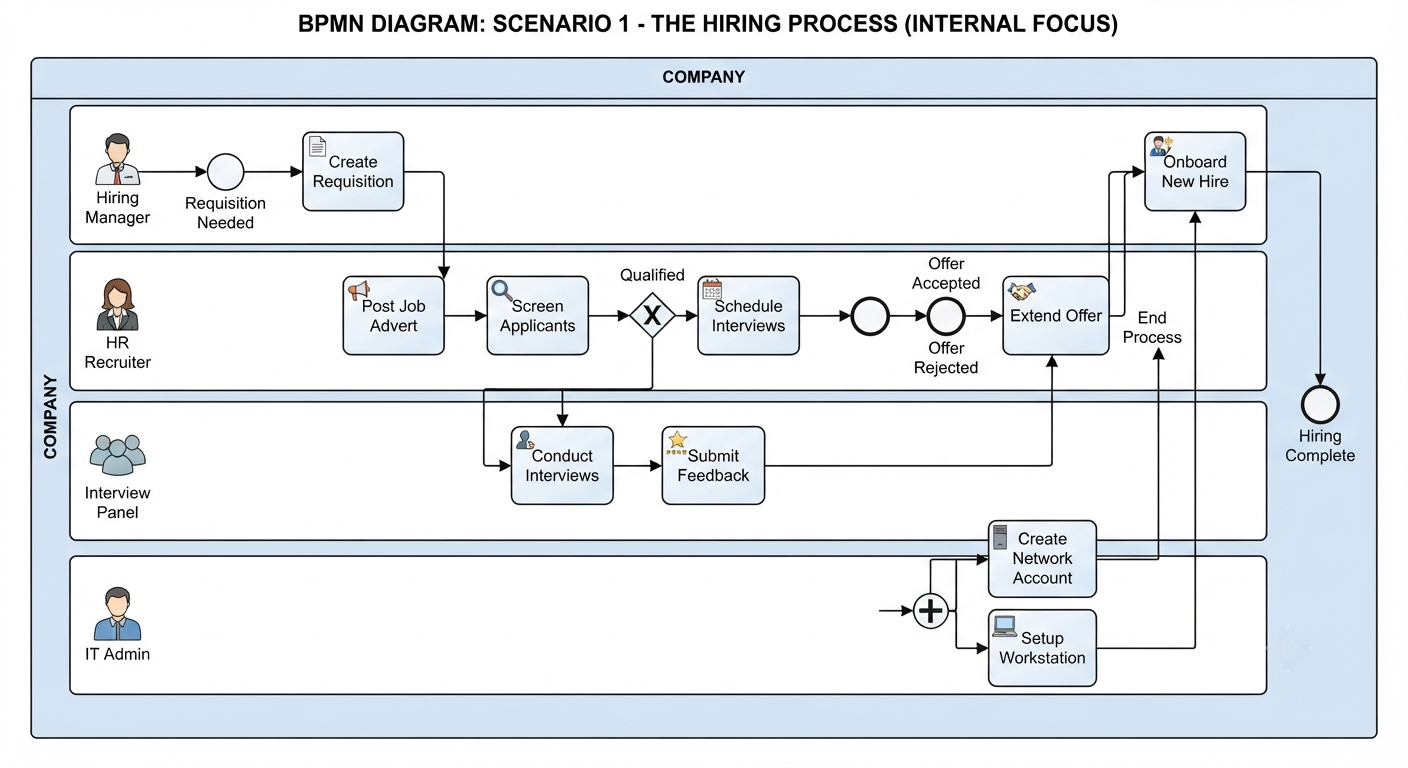
Structure: One Pool ("Company") with four Lanes.
Lanes: Hiring Manager, HR Recruiter, Interview Panel, IT Admin.
Flow:
Hiring Manager creates requisition (Lane: Hiring Manager).
HR posts job (Lane: HR Recruiter).
Candidates interviewed (Lane: Interview Panel).
Offer extended (Lane: HR Recruiter).
IT sets up account (Lane: IT Admin).
Why Lanes? All activities are within the same legal entity. Sequence flows cross lanes freely to show internal handoffs.
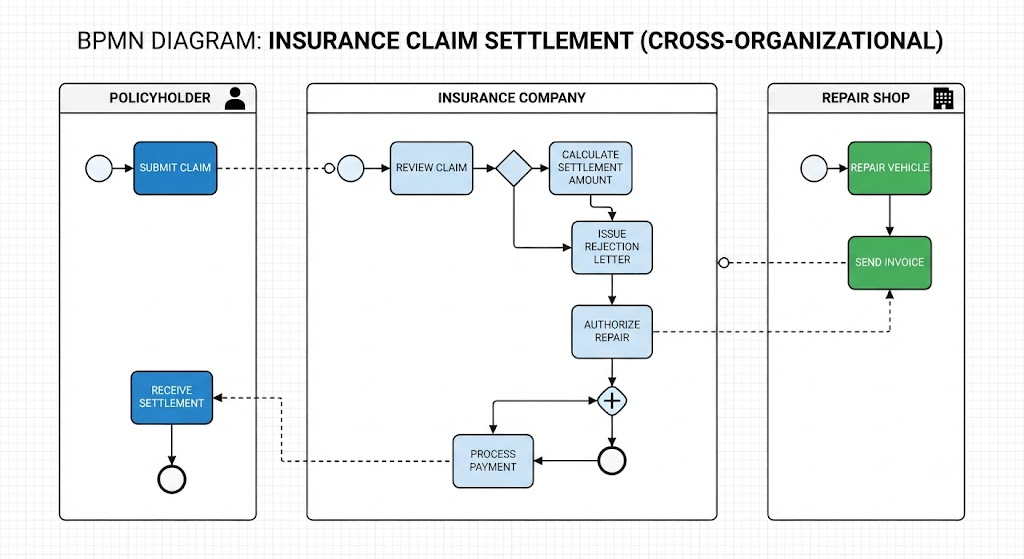
Structure: Three Pools.
Pools: Policyholder, Insurance Company, Repair Shop.
Flow:
Policyholder submits claim (Message Flow to Insurance Company).
Insurance Company reviews claim (Internal tasks in their pool).
Insurance Company authorizes repair (Message Flow to Repair Shop).
Repair Shop fixes car and invoices (Message Flow back to Insurance Company).
Why Pools? Three distinct entities. Communication is via formal messages (claims, authorizations, invoices). Sequence flows never cross pool boundaries.
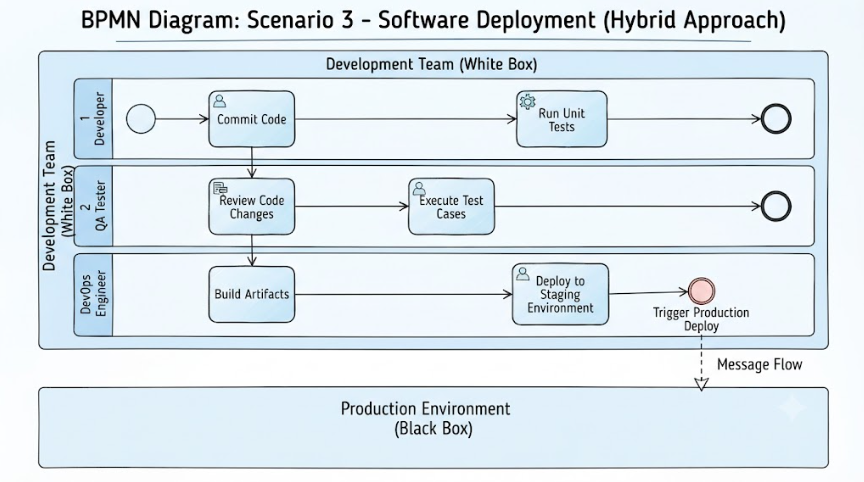
Structure: Two Pools, with Lanes in one.
Pool 1: Development Team (White Box)
Lanes: Developer, QA Tester, DevOps Engineer.
Pool 2: Production Environment (Black Box)
Flow:
Developer commits code (Lane: Developer).
QA tests (Lane: QA Tester).
DevOps deploys to staging (Lane: DevOps Engineer).
DevOps sends deploy command to Production (Message Flow to Pool 2).
Why Hybrid? Internal teamwork uses lanes for clarity; interaction with the external production system uses a pool and message flow to denote a boundary of control.
Mastering the distinction between Pools and Lanes is not merely a technical exercise—it is foundational to creating accurate, actionable, and compliant BPMN models.
Pools define who is involved in the collaboration and set the boundaries of control. They are the stage upon which the process plays out.
Lanes define who does what within that stage. They bring clarity to responsibility, handoffs, and internal workflow.
By strictly applying the core rules—sequence flows stay within pools, message flows cross pools, and sequence flows freely cross lanes—you ensure your diagrams are both logically sound and easy to understand.
Remember the best practices: use stable role names for lanes, label pools clearly, and avoid letting activities straddle lane boundaries. With these principles, you can transform complex, ambiguous processes into clear, visual stories that drive alignment, efficiency, and improvement across your organization.
Start auditing your existing BPMN diagrams today. Are you using pools where you should use lanes? Are sequence flows incorrectly crossing pool boundaries? Refining these elements will elevate the quality and utility of your process models significantly, turning them from simple drawings into powerful tools for business transformation.

