
In the world of business process management, we often spend the majority of our time modeling the "happy-day path"—the ideal scenario where every system works perfectly, every user makes the right choice, and data flows without interruption. However, reality is rarely so kind. Systems fail, data is missing, and unexpected conditions arise.
The true mark of a mature, resilient process model is not just how well it handles success, but how elegantly it manages failure. In Business Process Model and Notation (BPMN), error handling is not an afterthought; it is a structural necessity. By leveraging boundary events to create exception flows, you can explicitly define how your process should deviate from the standard path when things go wrong.
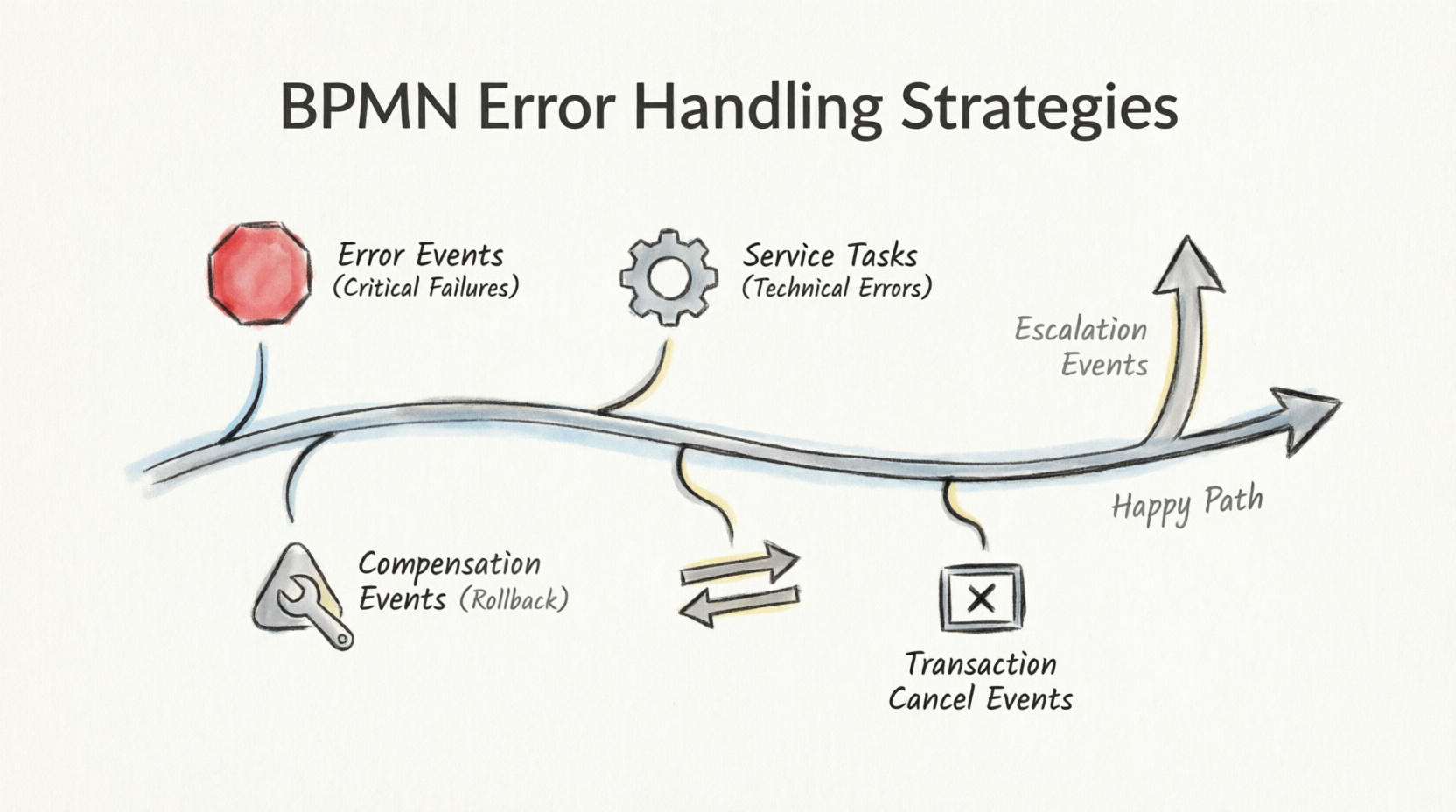
This guide explores specialized methods for robust error handling in BPMN, moving beyond basic troubleshooting to advanced techniques like compensation, transaction management, and escalation. Whether you are a business analyst, process architect, or developer, mastering these concepts will help you build processes that are not only efficient but also resilient.
The foundation of error handling in BPMN is the Boundary Event. These are intermediate events attached to the border of an activity (task or subprocess). They act as listeners, waiting for specific triggers to occur during the execution of that activity.
Interrupting vs. Non-Interrupting: Most error-handling boundary events are interrupting, meaning they immediately cancel the current activity and redirect the flow to an exception path. Some, like escalation events, can be non-interrupting, allowing the original work to continue while notifying another part of the process.
Error Boundary Events are the most direct mechanism for handling severe, unexpected problems. They are designed for situations where the current task simply cannot be completed due to a critical failure.
Always Interrupting: The moment an error occurs, the current activity is terminated.
Specific Triggers: They catch specific error codes or types defined in the process.
Reserve Error Events for serious errors where recovery within the current task is impossible. Do not use them for ordinary business conditions (e.g., "Customer declined offer") which should be modeled as standard gateways.
Imagine a task called "Verify Credit Score."
Happy Path: The credit bureau returns a score, and the process moves to "Approve/Deny Decision."
Error Scenario: The credit bureau’s API is down, or the connection times out.
BPMN Solution: Attach an Error Boundary Event labeled "Credit Bureau Unavailable" to the "Verify Credit Score" task. This diverts the flow to a "Notify IT Support" task or a "Manual Review Queue," rather than letting the process crash.
In automated processes, Service Tasks (marked with a gear icon) represent calls to external systems or software logic. These are prime candidates for technical error handling.
BPMN models serve as blueprints for developers. By identifying failure points in the model, you help engineers build robust "code scaffolding."
Mapping to Code: An Error Boundary Event on a Service Task translates directly to try/catch or try/except blocks in code.
Defining Criteria: The model helps define clear success and failure criteria for every automated step.
Consider a Service Task called "Process Credit Card Payment."
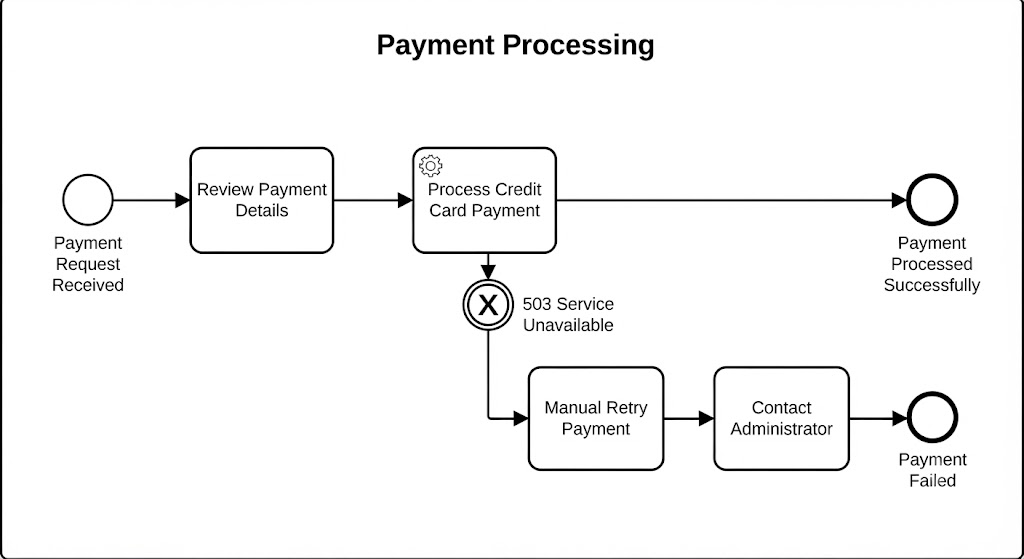
Technical Failure: The payment gateway returns a 503 Service Unavailable error.
BPMN Solution: An Error Boundary Event catches this technical fault. The exception flow might trigger a "Retry Logic" subprocess or alert a system administrator.
Developer Benefit: The developer knows exactly which exceptions to catch and what fallback logic to implement, ensuring the application doesn’t just hang or crash.
Sometimes, an error occurs late in a process, after several previous steps have already been successfully completed. You can’t just stop; you need to undo the work that was already done. This is where Compensation Events come in.
Throwing Event: A compensation event later in the process "throws" a signal.
Catching Event: A Compensation Boundary Event attached to a previous task "catches" this signal.
Compensation Task: This triggers a specific Compensation Task (marked with a double-triangle icon) designed to reverse the effects of the original task.
Use compensation when you need to maintain data integrity by reversing completed actions, such as refunds, cancellations, or inventory restocking.
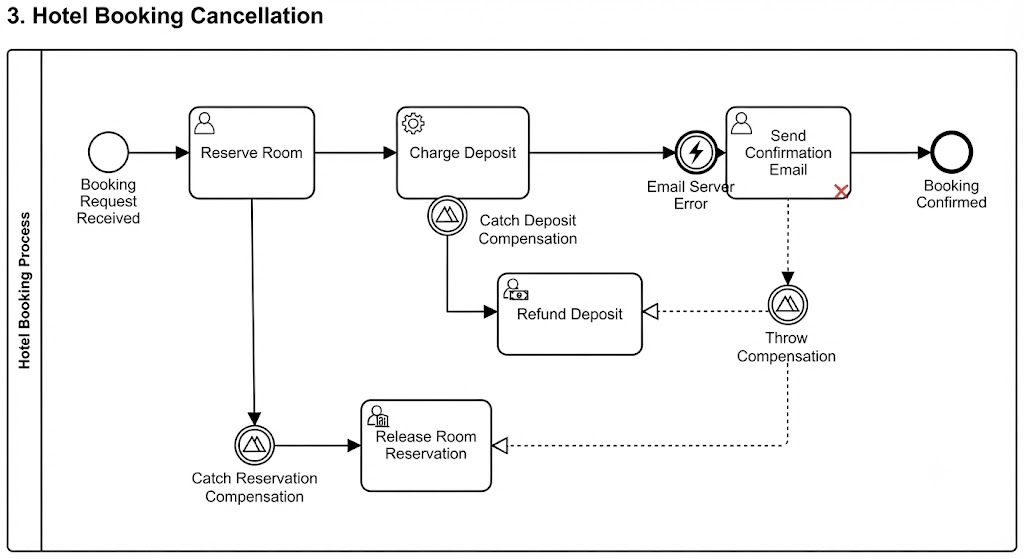
Task A: "Reserve Room" (Completed successfully).
Task B: "Charge Deposit" (Completed successfully).
Task C: "Send Confirmation Email" (Fails due to email server error).
The Problem: You can’t send the confirmation, so the booking is invalid. But you’ve already charged the customer and reserved the room.
BPMN Solution:
The failure in Task C throws a compensation event.
This triggers compensation handlers for Task B ("Refund Deposit") and Task A ("Release Room Reservation").
The process ends cleanly, with all side effects reversed.
For complex sets of activities that must succeed or fail as a single unit, use Transaction Subprocesses. These are depicted with double-lined borders.
All-or-Nothing: If any part of the transaction fails critically, the entire transaction should be aborted.
Cancel End Event: Used inside the transaction to signal that the transaction cannot be completed.
Boundary Cancel Event: Attached to the transaction subprocess to catch the cancellation and trigger rollback logic.
A transaction involves three steps:
Debit Buyer’s Account.
Credit Seller’s Account.
Update Stock Ledger.
If Step 3 fails (e.g., database lock), you cannot leave the money debited from the buyer and not credited to the seller.
BPMN Solution: Wrap these three steps in a Transaction Subprocess. If Step 3 fails, a Cancel End Event is triggered. This throws to a Boundary Cancel Event on the transaction, which initiates a rollback of Steps 1 and 2, ensuring financial consistency.
Not every problem requires stopping the current work. Sometimes, you need to notify a higher authority or a different department while the process continues. This is the role of Escalation Events.
Non-Interrupting (Typically): The current activity continues its normal flow.
Information Elevation: Sends a signal to a parent process or a separate pool to indicate that attention is needed.
Use escalation for issues that require human intervention or oversight but do not block the immediate technical execution of the task.
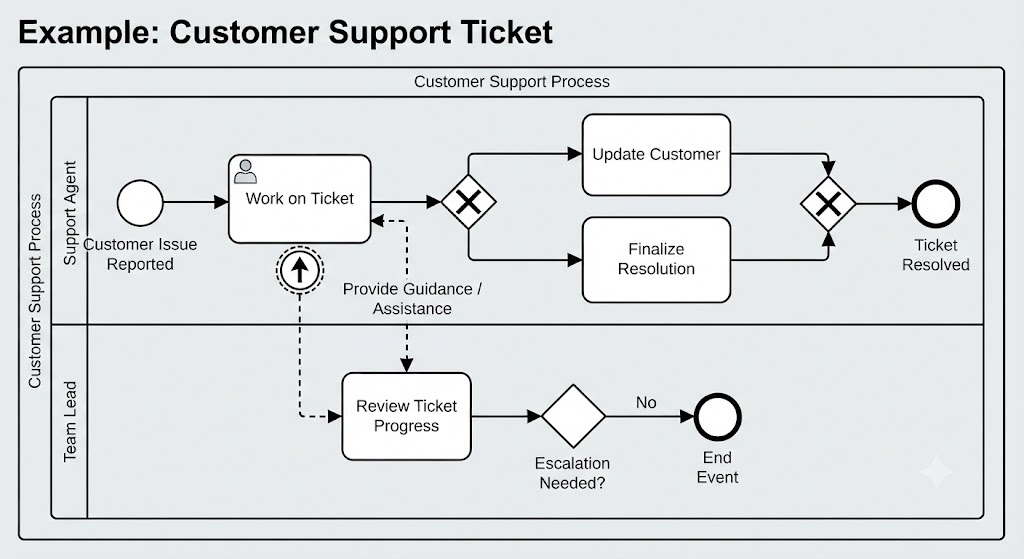
Task: "Resolve Customer Issue."
Scenario: The support agent has been working on a ticket for 48 hours without resolution.
BPMN Solution: An Escalation Boundary Event (triggered by a timer or manual flag) sends a notification to the "Team Lead" pool. The agent continues working on the ticket, but the lead is now aware and can prepare to assist if needed.
To ensure your BPMN diagrams remain clear, useful, and maintainable, follow these guidelines:
Always start by capturing the standard, error-free flow. This keeps stakeholders engaged and provides a clear baseline. Once the happy path is agreed upon, layer on the exception flows. This prevents the model from becoming overwhelming too quickly.
Do not clutter models with error notations for every possible minor condition. Cognitive overload makes diagrams hard to read and maintain.
Guideline: Only model errors that have significant business impact or require specific, non-standard handling. Minor conditions can often be handled within the service logic itself.
Population of your models with process details (time, cost, probability of failure) allows for simulation.
Benefit: Simulation helps identify where errors are most likely to occur and what their financial impact will be before implementation. It can reveal bottlenecks in your exception flows that you might have missed.
Ambiguity is the enemy of effective error handling. Use subject-verb construction for naming events to ensure all stakeholders understand the trigger immediately.
Bad: "Error" or "Failure"
Good: "Payment Gateway Timeout," "Inventory Check Failed," "Customer Data Missing"
Robust error handling is what separates a theoretical process model from a practical, executable business solution. By strategically using Error Events for critical failures, Compensation Events for rolling back work, Cancel Events for transactional integrity, and Escalation Events for oversight, you create processes that are resilient in the face of real-world complexity.
Remember, the goal is not to predict every possible thing that could go wrong, but to provide a clear, structured response when the unexpected happens. Start with the happy path, layer in exceptions judiciously, and always prioritize clarity. With these techniques, your BPMN models will not just document how work should happen, but how it will survive when things don’t go according to plan.

