In the world of business process modeling, we often design for the "happy path"—the ideal scenario where every step executes perfectly, data is always available, and users never make mistakes. However, real-world processes are messy. Systems fail, approvals get delayed, and data validation errors occur. Ignoring these realities leads to fragile processes that break under pressure.
This is where Boundary Events in Business Process Model and Notation (BPMN) become essential. They are not just decorative elements; they are the structural backbone of robust error handling. By attaching events directly to the boundary of an activity, modelers can define exactly how a process should react when things go wrong. Whether it’s canceling a failed transaction, sending a reminder for a delayed task, or rolling back completed work, boundary events provide the precision needed to build resilient workflows.
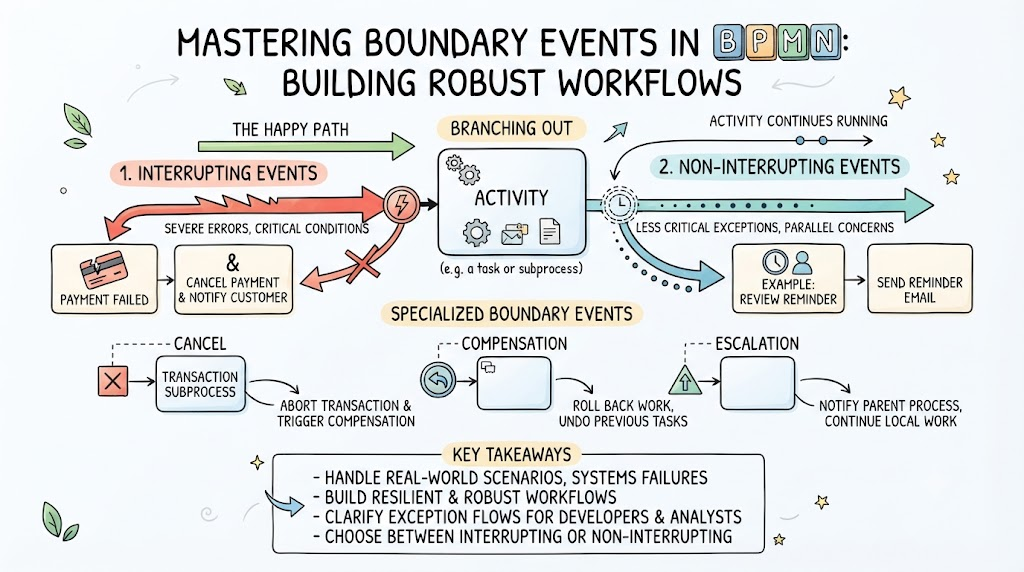
This guide explores the mechanics of boundary events, distinguishes between interrupting and non-interrupting types, and provides practical examples and best practices for implementing them effectively in your process models.
Key Concept: What Are Boundary Events?
A Boundary Event is an event attached to the outer edge (boundary) of an activity (task or subprocess). It waits for a specific trigger while that activity is active. When the trigger occurs, the boundary event catches it and diverts the process flow.
Core Characteristics:
- Attachment: Must be attached to the boundary of an activity.
- Trigger-Based: Activated by specific conditions (errors, timers, messages, escalations, etc.).
- Flow Diversion: Moves the process token away from the main path into an exception flow.
Types of Boundary Events: Interrupting vs. Non-Interrupting
The most critical distinction in boundary events is whether they stop the current activity or allow it to continue.
1. Interrupting Boundary Events
These events handle severe errors or critical conditions. When triggered:
- The associated activity is immediately canceled.
- The process token moves to the exception flow.
- No further work is done on the original activity.
Common Example: Error Boundary Event
- Scenario: A "Process Payment" task fails due to a gateway timeout.
- Action: The payment task is aborted. The process moves to an "Notify Customer of Failure" task.
- Why Interrupting? You cannot complete the payment if the gateway is down. Continuing would create inconsistent data.
2. Non-Interrupting Boundary Events
These events handle less critical exceptions or parallel concerns. When triggered:
- The main activity continues running.
- A new token is generated for a separate exception path.
- Both paths may run concurrently until one completes or merges.
Common Example: Non-Interrupting Timer Boundary Event
- Scenario: A "Review Document" task has a SLA of 48 hours.
- Action: After 24 hours, a timer triggers a "Send Reminder Email" task.
- Why Non-Interrupting? The reviewer still needs to finish the review. The reminder is just a nudge, not a cancellation.
Specialized Boundary Events for Advanced Scenarios
Beyond basic errors and timers, BPMN offers specialized boundary events for complex transactional and hierarchical processes.
1. Cancel Events
- Usage: Exclusively attached to Transaction Subprocesses.
- Function: Handles failed transactions by aborting the entire subprocess.
- Example: A "Book Travel" transaction includes booking flights, hotels, and cars. If the car rental fails, a Cancel Event aborts the entire transaction, triggering compensation to refund the flight and hotel.
2. Compensation Events
- Usage: Attached to activities that have defined compensation handlers.
- Function: "Rolls back" work by undoing a previously completed task.
- Example: In a "Order Fulfillment" process, if shipping fails after inventory was reserved, a Compensation Event triggers the "Release Inventory" compensation handler to return items to stock.
3. Escalation Events
- Usage: Attached to tasks or subprocesses.
- Function: Elevates information about a problem to a parent process without necessarily stopping the current work.
- Example: A "Handle Customer Complaint" task encounters a complex issue. An Escalation Event sends a message to the "Manager Review" pool in the parent process, while the original task continues attempting resolution.
Practical Examples
Example 1: E-Commerce Order Processing
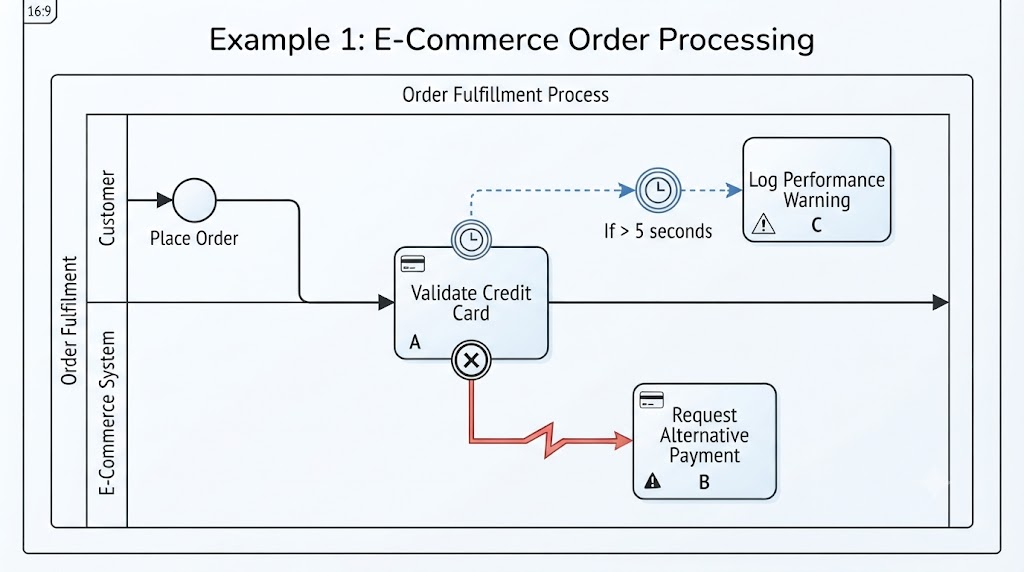
- Activity: "Validate Credit Card"
- Interrupting Error Boundary: If the card is declined, cancel validation and move to "Request Alternative Payment."
- Non-Interrupting Timer Boundary: If validation takes >5 seconds, trigger "Log Performance Warning" (but keep validating).
Example 2: Employee Onboarding
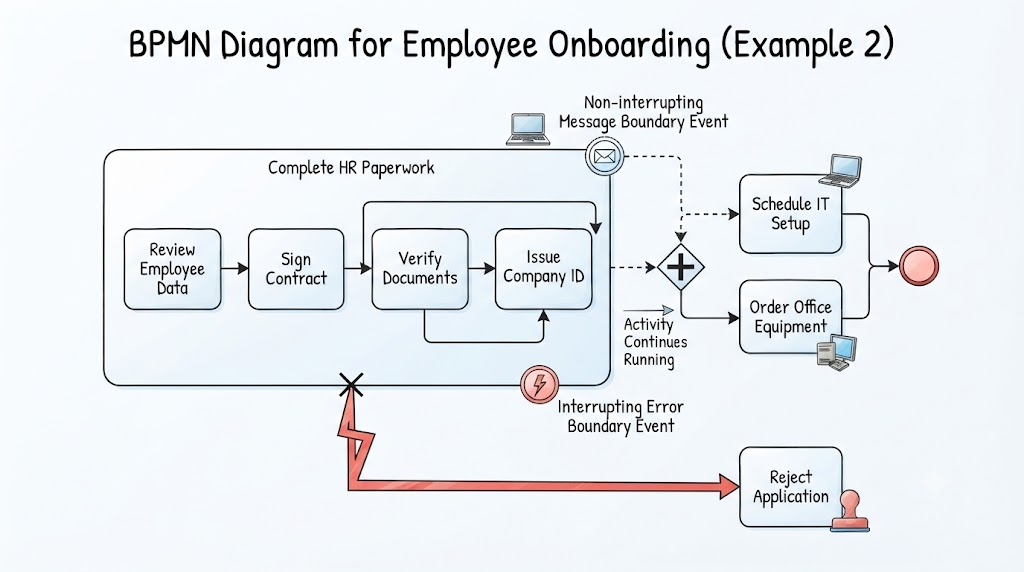
- Activity: "Complete HR Paperwork" (Subprocess)
- Non-Interrupting Message Boundary: If IT sends a "Laptop Ready" message, trigger "Schedule IT Setup" concurrently while HR paperwork continues.
- Interrupting Error Boundary: If background check fails, cancel the entire onboarding subprocess and move to "Reject Application."
Example 3: Financial Loan Approval
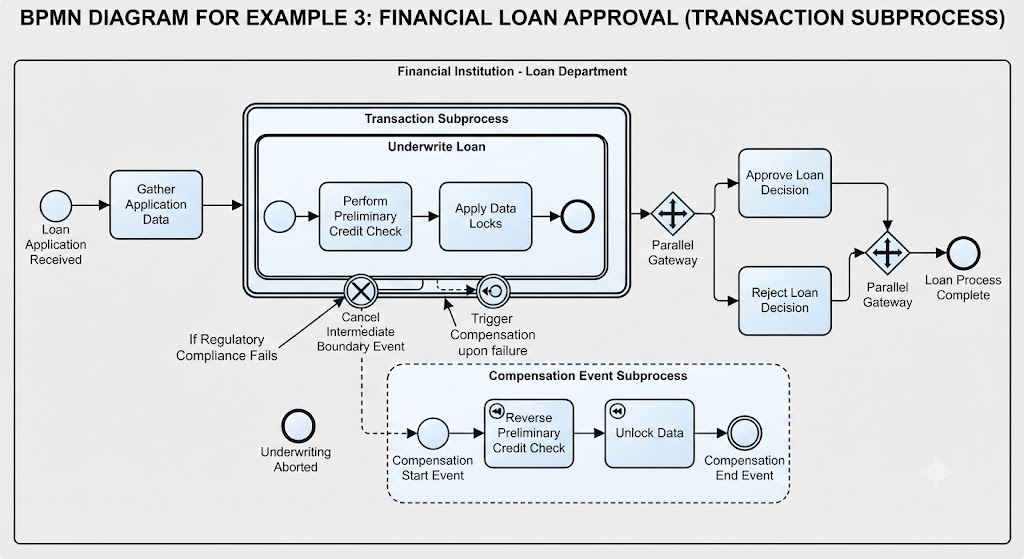
- Activity: "Underwrite Loan" (Transaction Subprocess)
- Cancel Boundary Event: If regulatory compliance fails, cancel the entire underwriting transaction.
- Compensation: Trigger compensation handlers to reverse any preliminary credit checks or data locks.
Technical Delivery: From Model to Code
Boundary events are not just visual aids; they provide a roadmap for engineers to build code scaffolding.
How Developers Use Boundary Events:
- Identify Try/Catch Blocks: Each interrupting boundary event maps to a
try/except or try/catch block in code.
- Define Success/Failure Criteria: The model explicitly states what constitutes an error (e.g., HTTP 500 vs. HTTP 400).
- Implement Compensation Logic: Compensation events translate to rollback functions or database transaction reversals.
- Build Async Handlers: Non-interrupting events map to asynchronous listeners or background jobs that don’t block the main thread.
Code Scaffolding Example (Python-like Pseudocode):
try:
    process_payment(order_id)  # Main Activity
except PaymentGatewayError as e:  # Interrupting Error Boundary
    cancel_payment(order_id)
    notify_customer_failure(order_id)
except TimeoutError as e:  # Non-Interrupting Timer Boundary (handled async)
    send_reminder_to_support(order_id)
    # Note: Main activity may still be running or retried
Best Practices
- Use Interrupting for Critical Failures: If the activity cannot logically continue, use an interrupting event. Don’t let a process hang in an invalid state.
- Use Non-Interrupting for Notifications & SLAs: For reminders, warnings, or parallel tasks, use non-interrupting events to keep the main flow alive.
- Limit Boundary Events per Activity: Avoid cluttering an activity with too many boundary events. If you have more than 2-3, consider refactoring into a subprocess.
- Clearly Label Exception Flows: Name the sequence flows coming from boundary events clearly (e.g., "Payment Failed," "SLA Breached") to improve readability.
- Match Event Type to Scope:
- Use Cancel Events only for Transaction Subprocesses.
- Use Compensation Events only when you have defined compensation handlers.
- Use Escalation Events when you need to inform a parent process without stopping local work.
- Document Triggers: Clearly document what specific condition triggers each boundary event (e.g., "Timer: 24 hours," "Error Code: 503").
Conclusion
Boundary events are the key to transforming fragile, idealistic process models into robust, real-world workflows. By mastering the distinction between interrupting and non-interrupting events, and leveraging specialized events like Cancel, Compensation, and Escalation, you can design processes that handle errors gracefully and predictably.
For product managers and business analysts, boundary events provide clarity on failure scenarios. For developers, they offer a clear blueprint for implementing error-handling logic. By integrating these concepts into your BPMN models, you ensure that your processes are not just efficient on paper, but resilient in practice.
Remember: A well-modeled exception is just as important as a well-modeled success path. Use boundary events to build processes that don’t just work when things go right, but survive when things go wrong.


