In the world of business process management, we often design for the "happy path"—the ideal scenario where everything goes according to plan. However, real-world processes are rarely so predictable. Systems fail, approvals are delayed, customers change their minds, and unexpected events occur. The true measure of a robust process model isn't how well it handles success, but how gracefully it manages failure and uncertainty.
Business Process Model and Notation (BPMN) provides powerful mechanisms for handling these exceptions through Boundary Events. These specialized elements allow process designers to attach error handlers, timeouts, and conditional triggers directly to activities, transforming rigid workflows into resilient, adaptive systems. This guide explores the intricacies of interrupting and non-interrupting boundary events, demonstrating how they can be leveraged to create processes that not only survive disruptions but respond to them intelligently.
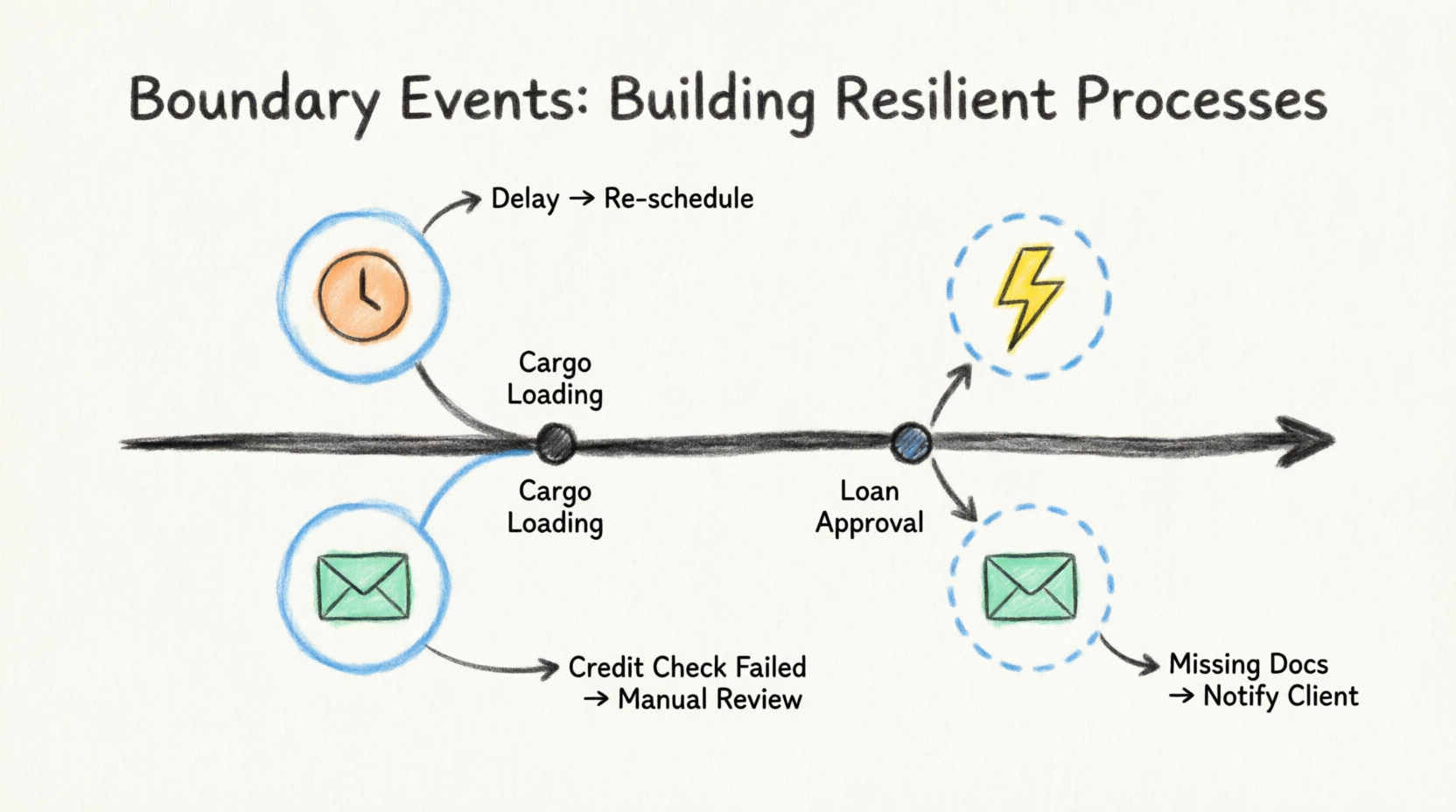
Whether you're modeling complex financial workflows, logistics operations, or customer service processes, understanding boundary events is essential for creating BPMN diagrams that reflect reality rather than idealized scenarios. Let's dive deep into these critical components of resilient process design.
Key Concepts
What Are Boundary Events?
Boundary events are special event types that are attached to the boundary of an activity (task or subprocess) rather than flowing through the normal sequence flow. They represent things that can happen during the execution of that activity. When triggered, they divert the process flow away from the normal path to handle the exceptional condition.
Two Types of Boundary Events
1. Interrupting Boundary Events
- Behavior: Immediately cancel the activity to which they are attached
- Visual Representation: Solid border line around the event
- Use Case: When an exception requires stopping the current work entirely
- Example: A payment processing task is interrupted when a fraud alert is detected
2. Non-Interrupting Boundary Events
- Behavior: Allow the activity to continue while spawning a parallel flow to handle the event
- Visual Representation: Dashed border line around the event
- Use Case: When you need to monitor or respond to conditions without stopping the main work
- Example: Sending reminder notifications while waiting for customer approval
Common Boundary Event Types
| Event Type |
Symbol |
Typical Use |
| Timer |
Clock icon |
Timeouts, deadlines, periodic checks |
| Error |
Lightning bolt |
System errors, validation failures |
| Message |
Envelope |
External communications, responses |
| Signal |
Radio waves |
Broadcast notifications across processes |
| Conditional |
Document with lines |
Business rule evaluations |
| Escalation |
Upward arrow |
Hierarchical escalations |
Guidelines for Using Boundary Events
When to Use Interrupting vs. Non-Interrupting Events
Use Interrupting Boundary Events When:
- The exception makes continuing the current activity meaningless or impossible
- Resources need to be released immediately
- The process must take a completely different path
- Data integrity requires aborting the current operation
Use Non-Interrupting Boundary Events When:
- You need to monitor progress without disrupting work
- Parallel actions should occur alongside the main activity
- Notifications or reminders need to be sent
- Secondary approvals or checks are required without stopping the primary workflow
- You want to collect metrics or trigger audits during execution
Placement Best Practices
- Attach to the Right Level: Place boundary events on the activity where the exception is most relevant
- Task-level: For specific operational exceptions
- Subprocess-level: For broader contextual exceptions
- Avoid Overloading: Don't attach too many boundary events to a single activity (3-4 maximum recommended)
- Clear Labeling: Always label boundary events clearly to indicate what triggers them
- Document Assumptions: Specify timeout durations, error conditions, and escalation paths
Detailed Examples
Example 1: Cargo Loading Process with Mission Cancellation
Scenario: A logistics company manages cargo loading for shipping missions. Various exceptions can occur during the loading process.
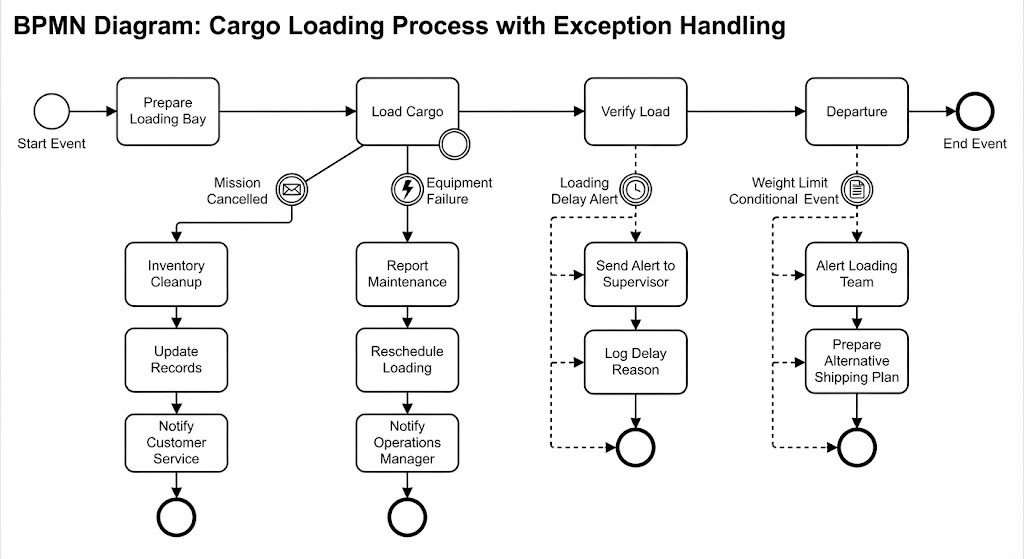
Process Flow:
[Start] → [Prepare Loading Bay] → [Load Cargo] → [Verify Load] → [Departure] → [End]
Boundary Events on "Load Cargo" Task:
- Interrupting Message Boundary Event: "Mission Cancelled"
- Trigger: Customer cancels the shipping mission
- Flow: Cancels loading → [Inventory Cleanup] → [Update Records] → [Notify Customer Service] → [End]
- Why Interrupting: Continuing to load cargo for a cancelled mission wastes resources and creates inventory discrepancies
- Interrupting Error Boundary Event: "Equipment Failure"
- Trigger: Forklift or conveyor belt malfunction
- Flow: Stops loading → [Report Maintenance] → [Reschedule Loading] → [Notify Operations Manager]
- Why Interrupting: Cannot safely continue loading with failed equipment
- Non-Interrupting Timer Boundary Event: "Loading Delay Alert"
- Trigger: Loading takes longer than 2 hours
- Flow: Continues loading AND → [Send Alert to Supervisor] → [Log Delay Reason]
- Why Non-Interrupting: Loading should continue; supervisor just needs visibility
- Non-Interrupting Conditional Boundary Event: "Weight Limit Warning"
- Trigger: Cargo weight approaches 90% of capacity
- Flow: Continues loading AND → [Alert Loading Team] → [Prepare Alternative Shipping Plan]
- Why Non-Interrupting: Team can adjust loading strategy without stopping
Benefits
- Prevents wasted effort on cancelled missions
- Ensures safety through immediate equipment failure response
- Provides proactive monitoring without disrupting operations
- Enables dynamic capacity management
Example 2: Loan Application Process with Secondary Approval
Scenario: A bank processes loan applications that require credit checks and approvals. Some applications need additional scrutiny without halting the entire process.
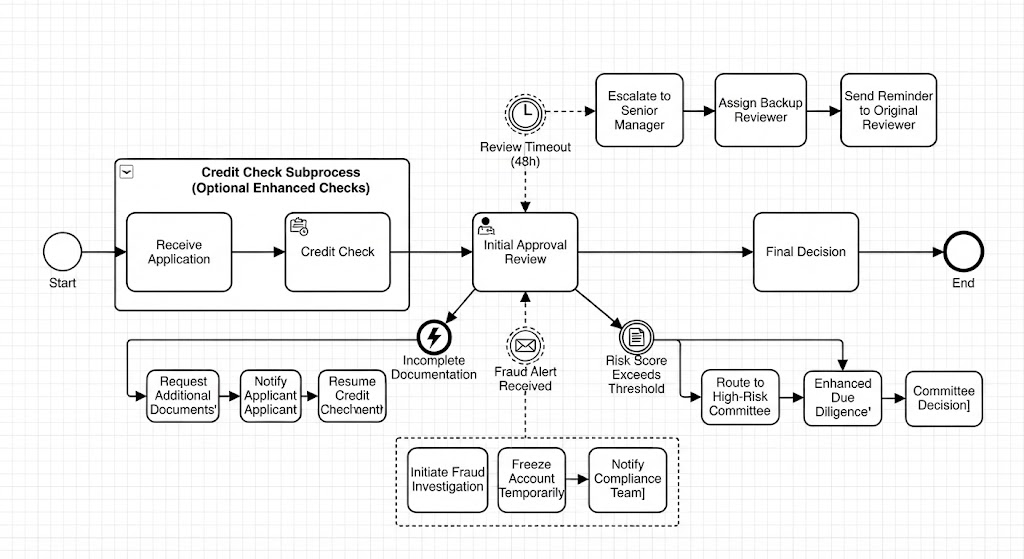
Process Flow:
[Start] → [Receive Application] → [Credit Check] → [Initial Approval Review] → [Final Decision] → [End]
Boundary Events on "Initial Approval Review" Task:
- Non-Interrupting Timer Boundary Event: "Review Timeout"
- Trigger: Reviewer hasn't completed assessment within 48 hours
- Flow: Review continues AND → [Escalate to Senior Manager] → [Assign Backup Reviewer] → [Send Reminder to Original Reviewer]
- Why Non-Interrupting: The original reviewer might still complete the work; escalation ensures backup coverage
- Interrupting Error Boundary Event: "Incomplete Documentation"
- Trigger: Missing required documents discovered during review
- Flow: Cancels review → [Request Additional Documents] → [Notify Applicant] → [Pause Application] → Wait for documents → [Resume Credit Check]
- Why Interrupting: Cannot properly review incomplete application
- Non-Interrupting Message Boundary Event: "Fraud Alert Received"
- Trigger: Fraud detection system flags suspicious activity
- Flow: Review continues AND → [Initiate Fraud Investigation] → [Freeze Account Temporarily] → [Notify Compliance Team]
- Why Non-Interrupting: Allows review to complete while investigation runs in parallel; both outcomes inform final decision
- Interrupting Conditional Boundary Event: "Risk Score Exceeds Threshold"
- Trigger: Real-time risk scoring indicates high-risk applicant
- Flow: Cancels standard review → [Route to High-Risk Committee] → [Enhanced Due Diligence] → [Committee Decision]
- Why Interrupting: Standard approval process insufficient for high-risk cases
Subprocess Enhancement:
The entire "Credit Check" could be a subprocess with its own boundary events:
- Non-interrupting timer: Send status update to applicant every 24 hours
- Interrupting error: Credit bureau unavailable → Retry with alternative bureau
Benefits:
- Maintains service level agreements through automatic escalations
- Handles exceptions without manual intervention
- Provides transparency to applicants through status updates
- Ensures regulatory compliance through parallel fraud checks
Example 3: E-Commerce Order Fulfillment
Scenario: An online retailer processes orders from placement to delivery.
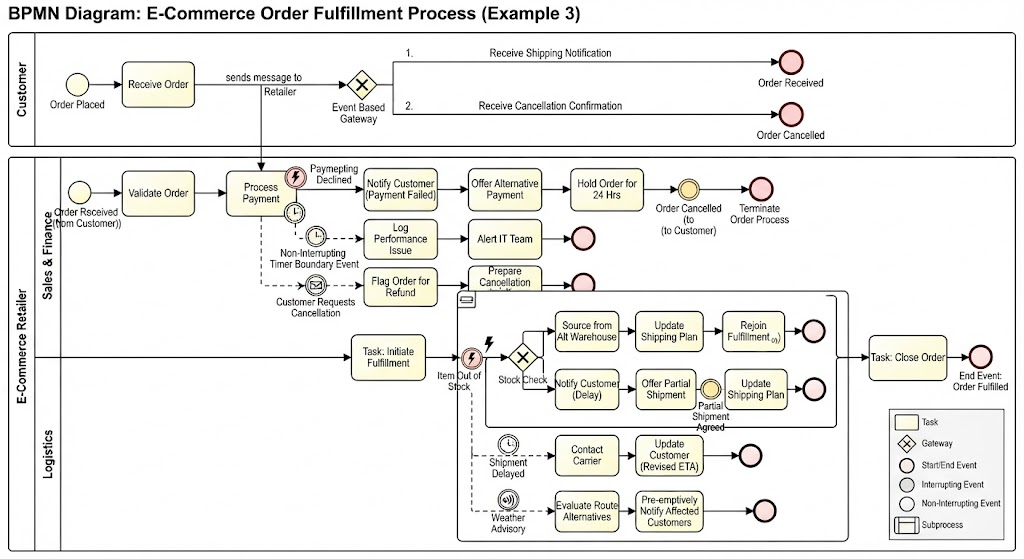
Boundary Events on "Process Payment" Task:
- Interrupting Error: "Payment Declined"
- Flow: Cancel payment processing → [Notify Customer] → [Offer Alternative Payment Methods] → [Hold Order for 24 Hours]
- Non-Interrupting Timer: "Payment Processing Slow"
- Trigger: Payment gateway response > 30 seconds
- Flow: Continue waiting AND → [Log Performance Issue] → [Alert IT Team]
- Non-Interrupting Message: "Customer Requests Cancellation"
- Flow: Continue payment processing AND → [Flag Order for Potential Refund] → [Prepare Cancellation Workflow]
Boundary Events on "Ship Order" Subprocess:
- Interrupting Error: "Item Out of Stock"
- Flow: Stop shipping → [Source from Alternate Warehouse] OR [Notify Customer of Delay] → [Offer Partial Shipment]
- Non-Interrupting Timer: "Shipment Delayed"
- Trigger: No tracking update in 48 hours
- Flow: Continue shipping AND → [Contact Carrier] → [Update Customer with Revised ETA]
- Non-Interrupting Signal: "Weather Advisory"
- Flow: Continue shipping AND → [Evaluate Route Alternatives] → [Pre-emptively Notify Customers in Affected Areas]
Example 4: Employee Onboarding Process
Scenario: HR manages new employee onboarding across multiple departments.
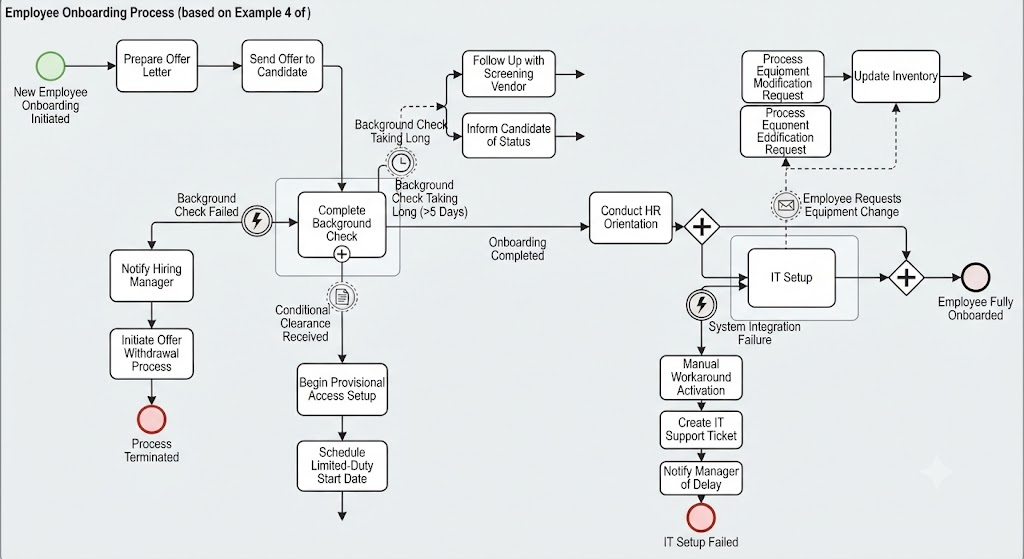
Boundary Events on "Complete Background Check" Task:
- Interrupting Error: "Background Check Failed"
- Flow: Stop onboarding → [Notify Hiring Manager] → [Initiate Offer Withdrawal Process] → [Archive Application]
- Non-Interrupting Timer: "Background Check Taking Long"
- Trigger: No result after 5 business days
- Flow: Continue waiting AND → [Follow Up with Screening Vendor] → [Inform Candidate of Status]
- Non-Interrupting Conditional: "Conditional Clearance Received"
- Flow: Continue background check AND → [Begin Provisional Access Setup] → [Schedule Limited-Duty Start Date]
Boundary Events on "IT Setup" Subprocess:
- Non-Interrupting Message: "Employee Requests Equipment Change"
- Flow: Continue standard setup AND → [Process Equipment Modification Request] → [Update Inventory]
- Interrupting Error: "System Integration Failure"
- Flow: Stop IT setup → [Manual Workaround Activation] → [Create IT Support Ticket] → [Notify Manager of Delay]
How to Implement Boundary Events: Step-by-Step
Step 1: Identify Potential Exceptions
- Brainstorm what could go wrong at each activity
- Consider time-based issues (delays, timeouts)
- Consider external dependencies (system failures, third-party responses)
- Consider business rule violations
- Consider human factors (absences, mistakes)
Step 2: Determine Impact Level
For each exception, ask:
- Can the activity continue meaningfully?
- Must resources be released immediately?
- Is there a parallel action needed?
- What's the business priority?
Step 3: Choose Event Type
- Timer: For duration-based exceptions
- Error: For technical/system failures
- Message: For external communications
- Signal: For cross-process notifications
- Conditional: For business rule evaluations
- Escalation: For hierarchical notifications
Step 4: Decide Interrupting vs. Non-Interrupting
- Will stopping the activity cause more harm than good?
- Is the exception informational or action-required?
- Can two flows execute simultaneously without conflict?
Step 5: Design the Exception Flow
- Map out the complete path from boundary event to resolution
- Ensure proper cleanup of resources
- Include notification steps
- Define rejoining points if applicable
- Consider compensation transactions for rolled-back work
Step 6: Validate and Test
- Walk through scenarios with stakeholders
- Verify no deadlocks or orphaned tokens
- Ensure all paths lead to proper completion or termination
- Test edge cases and multiple simultaneous exceptions
Benefits of Using Boundary Events
1. Improved Process Resilience
Processes can withstand disruptions without complete failure, maintaining business continuity even when exceptions occur.
2. Enhanced Visibility
Exception flows make implicit assumptions explicit, helping stakeholders understand what happens when things go wrong.
3. Reduced Manual Intervention
Automated exception handling reduces the need for human operators to monitor and react to every problem.
4. Better Resource Management
Interrupting events prevent waste by stopping futile work; non-interrupting events enable efficient parallel processing.
5. Regulatory Compliance
Explicit exception handling ensures audit trails for all process variations, meeting compliance requirements for financial, healthcare, and other regulated industries.
6. Improved Customer Experience
Proactive exception handling (like sending delay notifications) maintains trust even when problems occur.
7. Clearer Accountability
Boundary events clarify who is responsible for handling different types of exceptions.
Best Practices
Design Principles
- Keep It Simple
- Don't over-engineer exception handling
- Focus on the most common and impactful exceptions first
- Avoid deeply nested exception flows
- Be Explicit
- Clearly label what triggers each boundary event
- Document timeout durations and thresholds
- Specify who receives notifications
- Ensure Completeness
- Every interrupting flow should have a clear end point
- Consider what happens if multiple boundary events trigger simultaneously
- Handle the "exception to the exception" (what if the error handler fails?)
- Maintain Consistency
- Use similar patterns for similar exceptions across processes
- Standardize timeout values where appropriate
- Apply consistent naming conventions
- Plan for Compensation
- When interrupting events roll back work, ensure proper cleanup
- Use compensation boundary events or compensation handlers for complex rollback scenarios
- Log all compensating actions for audit purposes
Technical Considerations
- Avoid Token Conflicts
- Be cautious with non-interrupting events that modify shared data
- Use correlation IDs to track parallel flows
- Ensure thread-safe operations in automated implementations
- Consider Performance
- Too many non-interrupting timers can create performance overhead
- Batch similar notifications where possible
- Set reasonable timeout values (not too short, not too long)
- Test Thoroughly
- Unit test each boundary event independently
- Integration test combinations of boundary events
- Stress test with multiple simultaneous exceptions
- Verify timeout behaviors under load
Documentation Standards
- Document Assumptions
- Why was this boundary event added?
- What business requirement does it address?
- What are the expected frequencies?
- Maintain Version Control
- Track changes to exception handling logic
- Document why exception flows were modified
- Keep historical versions for audit purposes
Common Pitfalls to Avoid
❌ Pitfall 1: Overusing Non-Interrupting Events
Problem: Creating too many parallel flows that consume resources and complicate debugging.
Solution: Reserve non-interrupting events for truly parallel concerns; use sequential handling where appropriate.
❌ Pitfall 2: Ignoring Multiple Simultaneous Exceptions
Problem: Not considering what happens when two boundary events trigger at once.
Solution: Define priority rules or design flows that can handle concurrent exceptions gracefully.
❌ Pitfall 3: Missing Cleanup Steps
Problem: Interrupting an activity without releasing reserved resources or rolling back partial work.
Solution: Always include compensation or cleanup steps in interrupting flows.
❌ Pitfall 4: Vague Triggers
Problem: Boundary events labeled generically like "Error" without specifying what error.
Solution: Be specific: "Payment Gateway Timeout," "Inventory Validation Failed," etc.
❌ Pitfall 5: Orphaned Flows
Problem: Exception flows that don't reconnect to the main process or reach a proper end state.
Solution: Ensure every flow has a clear termination point or merge point.
❌ Pitfall 6: Inconsistent Timeout Values
Problem: Similar activities having wildly different timeout thresholds without justification.
Solution: Establish organizational standards for common timeout scenarios.
Advanced Patterns
Pattern 1: Escalation Chain
Multiple non-interrupting timer boundary events creating progressive escalations:
- 24 hours: Notify team lead
- 48 hours: Notify department manager
- 72 hours: Notify VP and initiate contingency plan
Pattern 2: Retry with Exponential Backoff
Interrupting error boundary event leading to a retry subprocess:
- First failure: Wait 5 minutes, retry
- Second failure: Wait 15 minutes, retry
- Third failure: Escalate to manual intervention
Pattern 3: Circuit Breaker
Non-interrupting conditional boundary event monitoring error rates:
- If error rate > 10%: Activate degraded mode
- If error rate > 25%: Halt processing and alert engineering
- Allows system to self-regulate under stress
Pattern 4: Compensating Transaction
When an interrupting event occurs after partial completion:
- Use compensation boundary events on previously completed tasks
- Execute reverse operations (refund, release reservation, cancel notification)
- Maintain data consistency across distributed systems
Pattern 5: Monitoring Dashboard Feed
Non-interrupting signal boundary events broadcasting status updates:
- Each major milestone sends signals to monitoring systems
- Enables real-time dashboards without affecting process flow
- Supports analytics and SLA tracking
Conclusion
Boundary events transform BPMN from a simple flowcharting notation into a powerful tool for designing resilient, real-world business processes. By mastering both interrupting and non-interrupting boundary events, process designers can create models that gracefully handle the inevitable exceptions, delays, and uncertainties that characterize actual business operations.
The key insight is that exception handling isn't an afterthought—it's a fundamental aspect of process design. The cargo loading example showed how interrupting events prevent waste while non-interrupting events provide visibility. The loan application scenario demonstrated how parallel exception flows can enhance both efficiency and compliance. These patterns scale from simple tasks to complex multi-system orchestrations.
As you apply these concepts, remember that the goal isn't to anticipate every possible failure mode, but to create processes flexible enough to adapt when the unexpected occurs. Start with the most critical exceptions, implement clear and maintainable flows, and iterate based on real-world feedback.
Well-designed boundary events do more than handle errors—they build trust. Customers receive timely notifications when delays occur. Managers gain visibility into bottlenecks before they become crises. Compliance teams can verify that proper procedures were followed even in exception scenarios. And operations teams spend less time firefighting and more time optimizing.
In an increasingly complex and interconnected business environment, resilient process design isn't optional—it's competitive advantage. Boundary events are your toolkit for building that resilience. Use them wisely, document them clearly, and watch your processes transform from fragile sequences into robust, adaptive systems capable of thriving amid uncertainty.
Quick Reference Checklist
Before finalizing your BPMN diagram with boundary events:
- Identified all realistic exceptions for each activity
- Chosen appropriate event types (timer, error, message, etc.)
- Decided interrupting vs. non-interrupting based on business impact
- Labeled all boundary events with specific trigger conditions
- Designed complete exception flows with proper endpoints
- Included necessary cleanup/compensation steps
- Added notifications and escalations where appropriate
- Verified no orphaned flows or token conflicts
- Documented timeout values and thresholds
- Tested scenarios with stakeholders
- Considered multiple simultaneous exceptions
- Applied consistent patterns across related processes
- Planned for monitoring and analytics integration
This guide provides a foundation for implementing boundary events in your BPMN models. As you gain experience, you'll develop intuition for when and how to apply these patterns effectively. Remember: the best process models are those that reflect reality, exceptions included.


