
In today's rapidly evolving software landscape, clear communication and precise architectural planning are more critical than ever. The Unified Modeling Language (UML) serves as a universal visual language that empowers teams to design, document, and discuss complex systems with clarity and confidence. Whether you're a seasoned software architect, a product manager coordinating cross-functional teams, or a developer bringing ideas to life, UML provides the structured vocabulary needed to transform abstract concepts into actionable blueprints.
Who should read this guide:
| Role | What You'll Gain |
|---|---|
| Product Managers | Techniques to clarify requirements, align stakeholders, and reduce scope ambiguity |
| Software Architects | Frameworks for modeling complex systems and documenting architectural decisions |
| Developers | Practical patterns for translating designs into code and maintaining living documentation |
| Agile Teams | Strategies for lightweight, just-in-time modeling that complements iterative development |
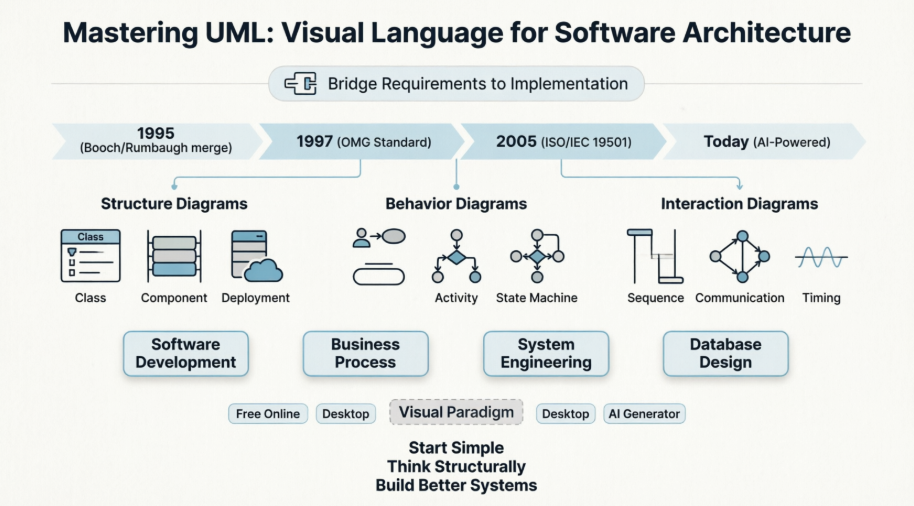
This comprehensive guide walks you through everything you need to know about UML—from its foundational principles and historical evolution to practical diagram types, modern tooling with Visual Paradigm, and emerging AI-powered capabilities. By the end, you'll have the knowledge to select the right diagrams for your projects, leverage Visual Paradigm's industry-leading platform effectively, and apply UML practices that enhance collaboration, reduce ambiguity, and accelerate delivery.
UML emerged in the mid-1990s amid a proliferation of competing object-oriented modeling approaches. At the 1995 OOPSLA Conference, Grady Booch and James Rumbaugh began merging their respective methods. Rational Software later acquired Ivar Jacobson's Objectory company, incorporating the Objectory method into what became UML.
The Object Management Group (OMG) adopted UML as a standard in 1997, providing formal governance. In 2005, it gained international recognition as the ISO/IEC 19501 standard. UML 2.5.1 (December 2017) represents the current standard as of 2026, focused on consolidation and precision rather than introducing new diagram types.
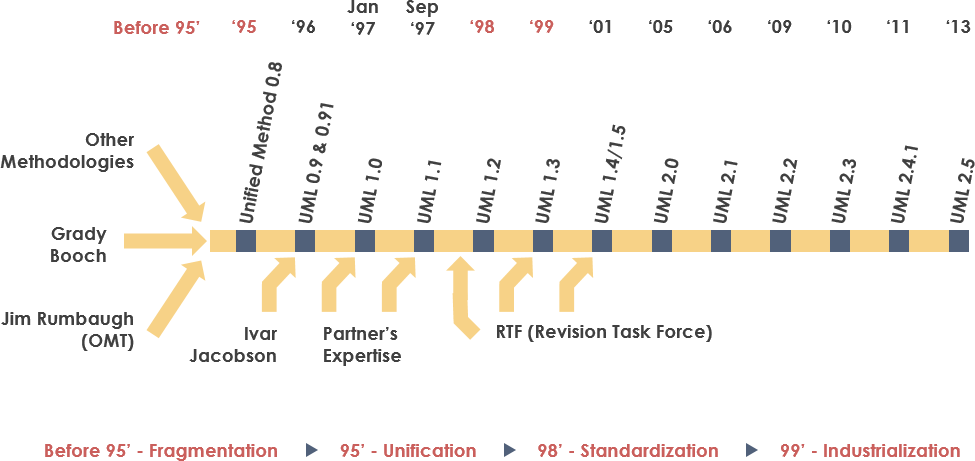
Key Evolution Milestones:
1997: OMG adoption (UML 1.1)
2005: ISO/IEC 19501 international standard
2015: UML 2.5 major revision (simplified semantics, improved consistency)
2017: UML 2.5.1 maintenance release (clarifications, errata fixes)
The language serves dual roles: a formal metamodel defining elements like classes and relationships, and a collection of graphical notations for visualizing systems.
UML is primarily used in software development across industries and domains. Its language-independent nature makes it suitable for modeling systems regardless of the target programming language. With Visual Paradigm's code engineering capabilities, teams can generate source code directly from UML models and reverse-engineer existing code into diagrams.
Beyond traditional software, UML finds application in:
🔄 Business process modeling and workflow optimization
⚙️ System engineering and functional modeling
🗄️ Database schema design and data architecture
📋 Workflow documentation (legal, healthcare, financial compliance)
🔌 Hardware design and medical electronics specification
🤖 AI/ML system architecture documentation
Integration with Development Methodologies:
UML integrates well with methodologies such as the Rational Unified Process (RUP), and earlier approaches like OMT, Booch, and Objectory. While originally focused on object-oriented design, UML excels in non-OO contexts too—including functional, procedural, and event-driven architectures.
💡 Practical Insight: Most practitioners use informal, often hand-drawn diagrams inspired by UML rather than strict formal models. Visual Paradigm supports both approaches—quick sketching for agile exploration and formal modeling for enterprise documentation.
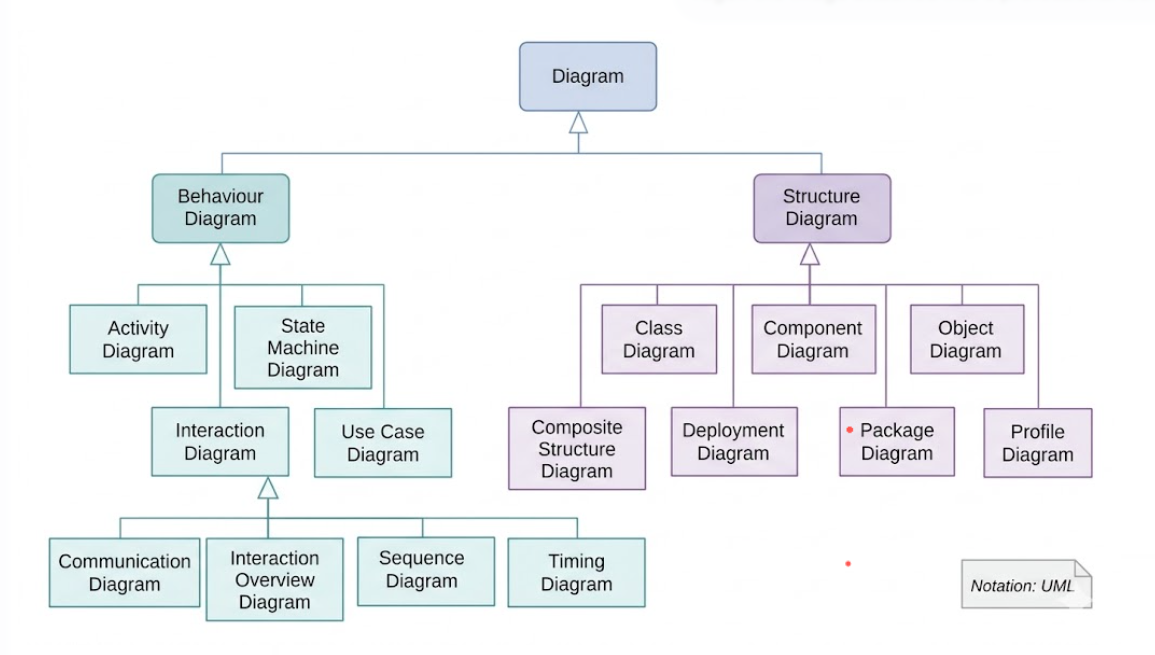
UML diagrams visualize multiple system aspects, including structure, behavior, and interactions.
| Category | Purpose | Common Diagrams |
|---|---|---|
| Structure | Static architecture, components, relationships | Class, Component, Deployment, Package |
| Behavior | System dynamics, workflows, state changes | Use Case, Activity, State Machine |
| Interaction | Message flow, temporal sequencing | Sequence, Communication, Timing |
Cardinality Notation: Follows the "look-across" approach common in ER diagrams. Researchers note this can present challenges for complex n-ary relationships (order > 2), though it remains the standard.
Artifacts: Represent physical deliverables in the development process—source code, executables, scripts, database tables, documents, etc. Artifacts are deployed to nodes and can be composed of other artifacts. Classes and components manifest into artifacts before deployment.
Metamodeling: Uses the OMG's Meta-Object Facility (MOF), a four-layer architecture (M3 to M0). The UML metamodel itself sits at the M2 layer. Stereotyping allows extension of the metamodel, though this mechanism has faced some criticism regarding scalability.
Interoperability: Models can be shared between tools using the XML Metadata Interchange (XMI) format. Visual Paradigm fully supports XMI import/export, enabling seamless model exchange and long-term archival.
UML 2 defines a rich taxonomy of 14 diagram types. Below is a practical selection guide organized by use case, with Visual Paradigm-specific tips for each.
| If you need to... | Use this diagram | Visual Paradigm Tip |
|---|---|---|
| Clarify user goals & system scope | Use Case | Use the Requirement module to link use cases to user stories |
| Design data structures & relationships | Class | Enable code engineering to sync diagrams with Java/C# code |
| Model business processes or workflows | Activity | Add swimlanes to map responsibilities across teams |
| Document API/message sequences | Sequence | Use combined fragments (alt/opt/loop) for complex logic |
| Show runtime deployment topology | Deployment | Model cloud infrastructure with container and artifact nodes |
| Model state-driven behavior | State Machine | Validate transitions with Visual Paradigm's simulation feature |
| Organize large codebases/modules | Package | Use package dependencies to visualize architectural boundaries |
| Visualize component interfaces | Component | Define provided/required interfaces with lollipop/socket notation |
| Capture instance-level snapshots | Object | Generate object diagrams from class diagrams for testing scenarios |
| Model real-time timing constraints | Timing | Use duration constraints for embedded/IoT system design |
| Define domain-specific extensions | Profile | Create custom stereotypes for industry-specific modeling |
Emphasize static architecture using objects, classifiers, relationships, attributes, and operations
Purpose: Blueprint of classes (code-level) required to build a software system
Key Elements: Classes (3 compartments: name, attributes, operations), relationships (association, inheritance, composition, aggregation, dependency)
Visual Paradigm Advantage:
Real-time code engineering: changes in diagram update source code and vice versa
Smart connectors automatically suggest valid relationship types
Built-in validation checks for UML 2.5.1 compliance
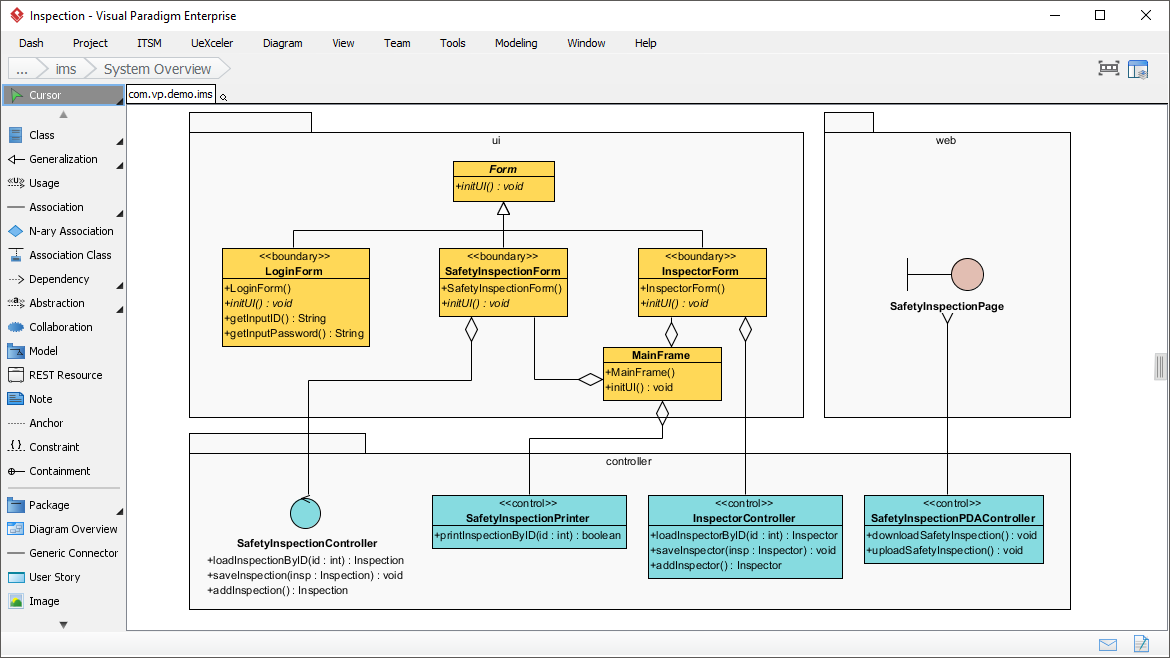
Purpose: Model system decomposition and interface contracts
Key Elements: Components ( stereotype), provided/required interfaces (lollipop/socket notation), dependencies
Visual Paradigm Advantage:
Visualize microservices architecture with nested components
Generate interface documentation automatically
Link components to deployment nodes for end-to-end traceability
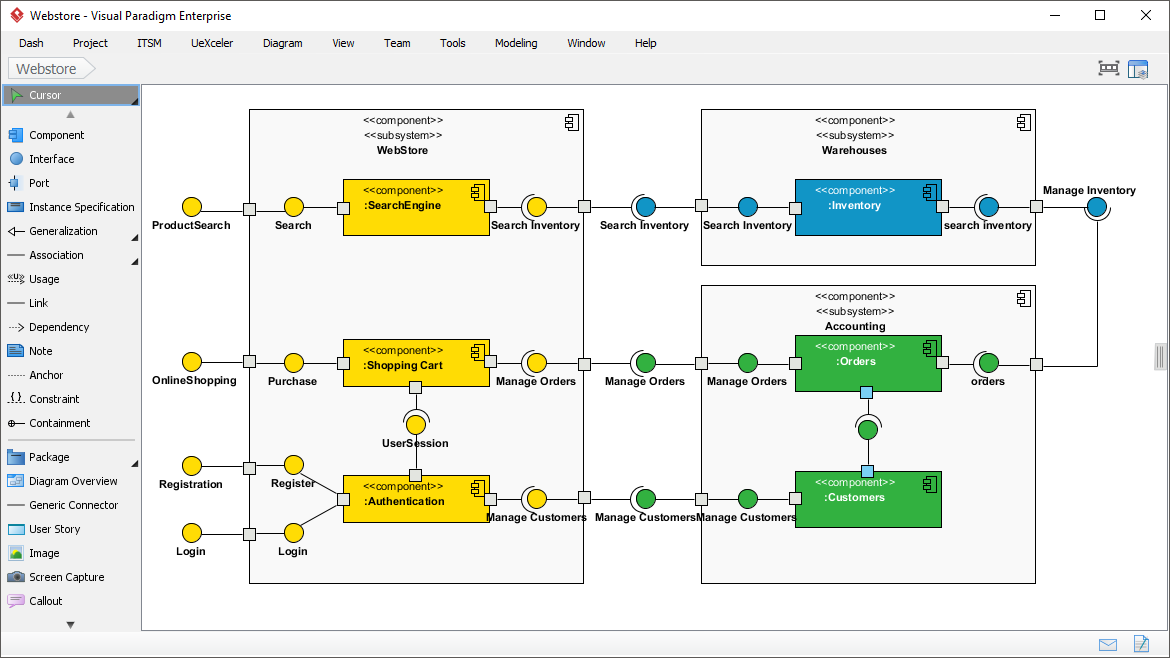
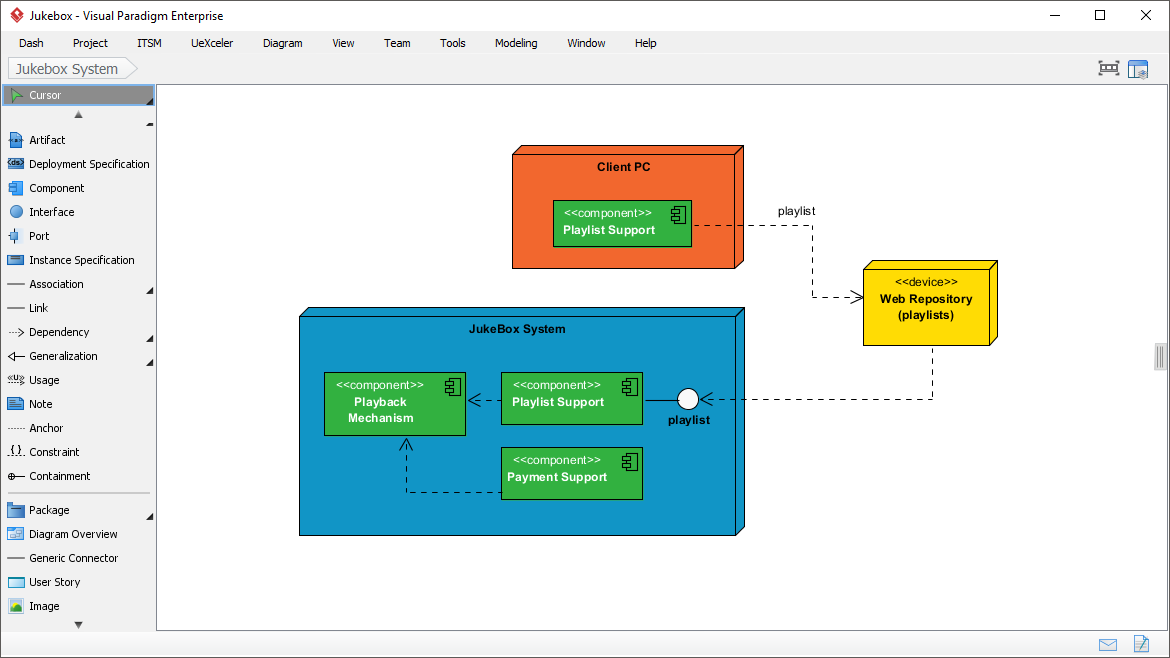
Purpose: Model physical/runtime topology of software artifacts
Key Elements: Nodes (3D cubes for servers/devices), artifacts (software components), communication paths
Visual Paradigm Advantage:
Pre-built cloud provider icons (AWS, Azure, GCP)
Model container orchestration (Kubernetes pods, services)
Export deployment specs for infrastructure-as-code tools
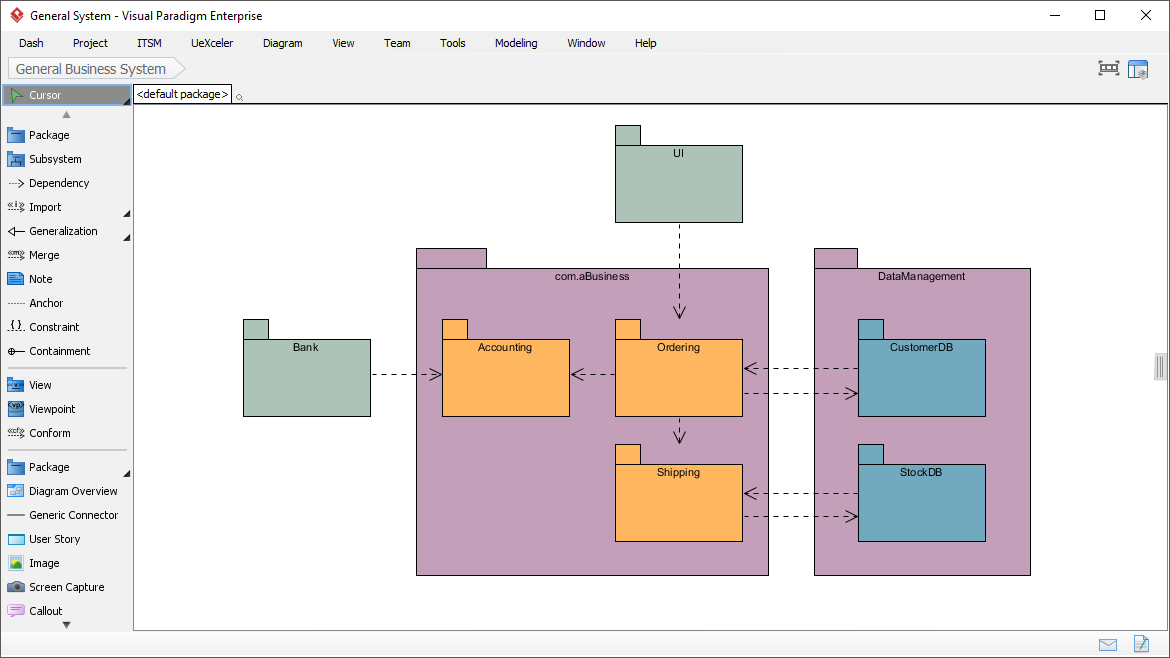
Purpose: Organize model elements into logical namespaces for large-scale projects
Key Elements: Packages (folder icons), dependencies (dashed arrows), nested structures
Visual Paradigm Advantage:
Auto-generate package diagrams from existing project structure
Visualize dependency cycles with architecture analysis reports
Align packages with team ownership for modular development
Focus on system dynamics and object collaborations
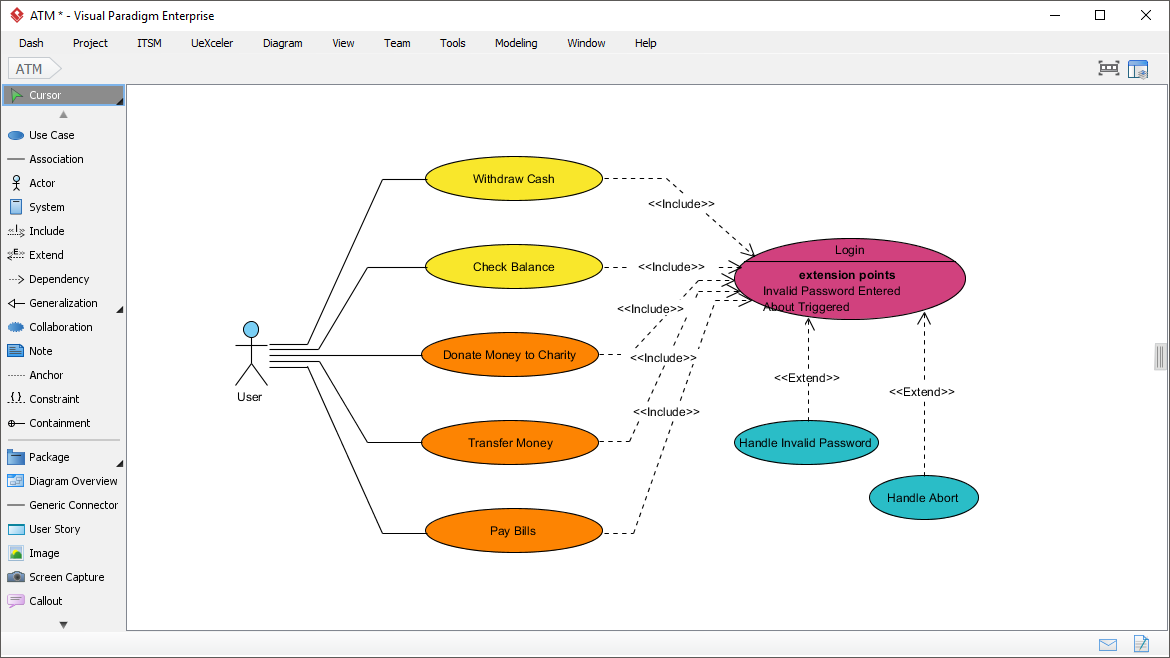
Purpose: Capture functional requirements and user-system interactions
Key Elements: Actors (stick figures), use cases (ovals), relationships (association, include, extend, generalize)
Visual Paradigm Advantage:
Link use cases to requirements, user stories, and test cases
Generate requirement traceability matrices automatically
Export use case specifications to Word/Confluence with one click
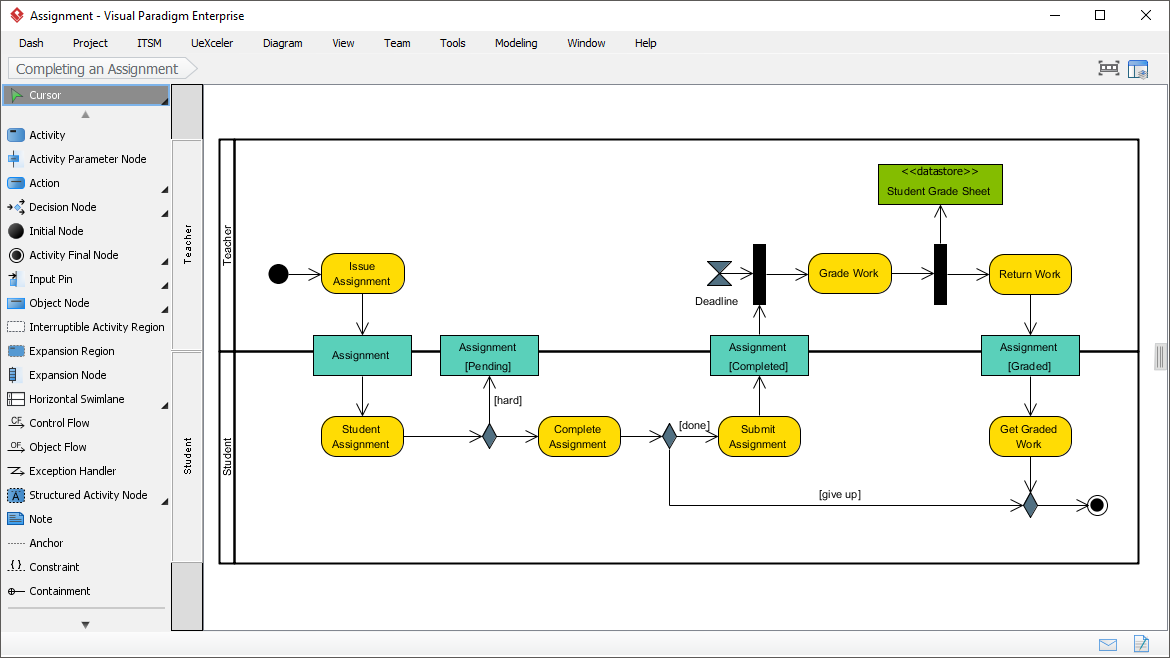
Purpose: Model workflows, business processes, and operational logic
Key Elements: Actions (rounded rectangles), decisions (diamonds), swimlanes (responsibility partitions), control flow
Visual Paradigm Advantage:
Simulate workflow execution to validate logic before implementation
Add business rules to decision nodes for executable specifications
Export to BPMN for process automation platforms
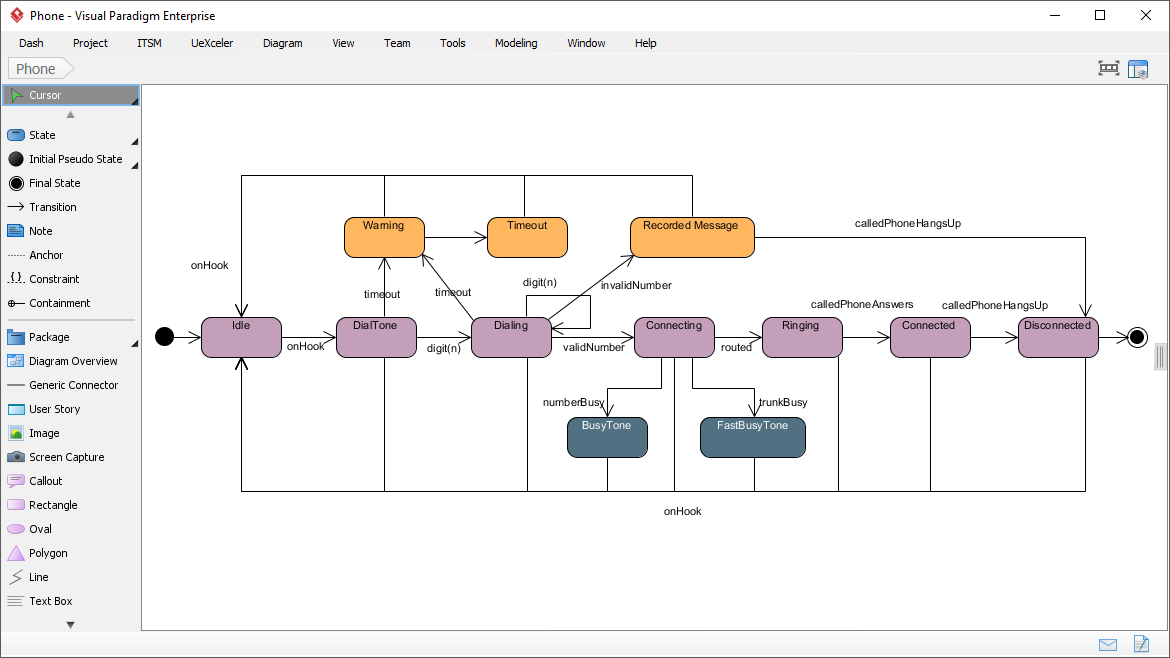
Purpose: Model event-driven behavior and object lifecycle
Key Elements: States (rounded rectangles), transitions (arrows with triggers/actions), initial/final states
Visual Paradigm Advantage:
Validate state transitions with built-in simulation
Generate state machine code skeletons for Java, C#, or C++
Visualize complex nested states with composite state notation
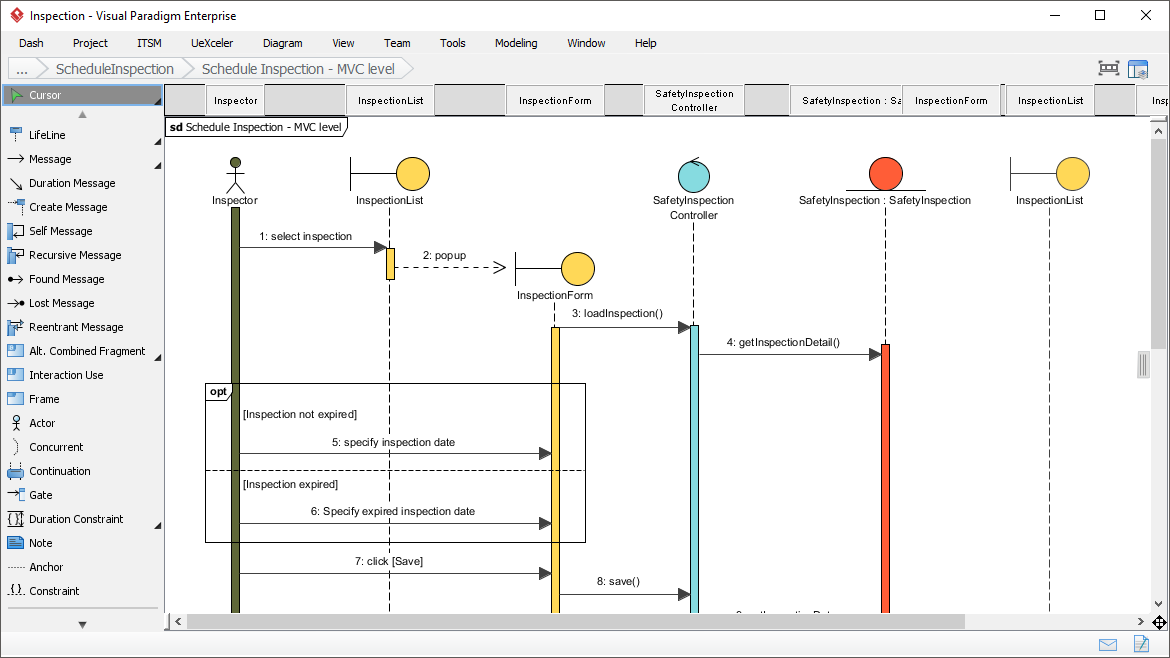
Detail control and data flow between objects over time
Purpose: Visualize time-ordered message exchanges between participants
Key Elements: Lifelines (vertical dashed lines), messages (horizontal arrows), activation bars, combined fragments (alt/opt/loop)
Visual Paradigm Advantage:
Auto-generate sequence diagrams from code execution traces
Use timeline ruler to measure interaction durations
Export to interactive HTML for stakeholder review
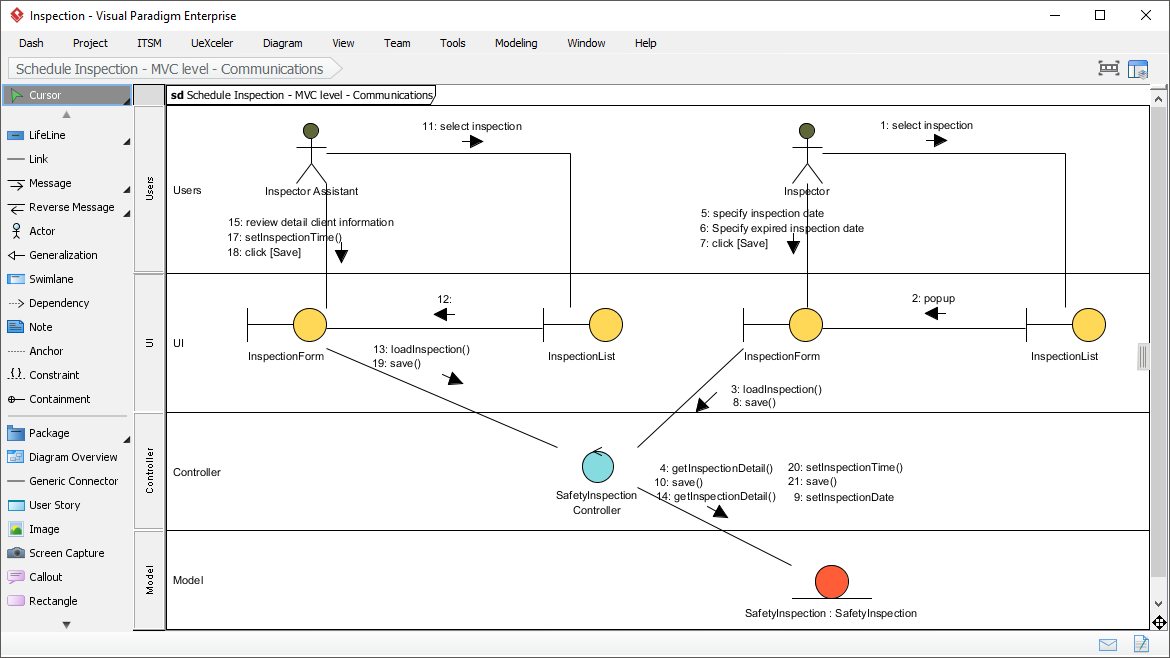
Purpose: Show structural organization of message flow (alternative view to sequence)
Key Elements: Objects (rectangles), links (communication paths), numbered messages
Visual Paradigm Advantage:
Toggle between sequence and communication views of the same interaction
Highlight message paths for impact analysis
Annotate messages with performance metrics or SLA constraints
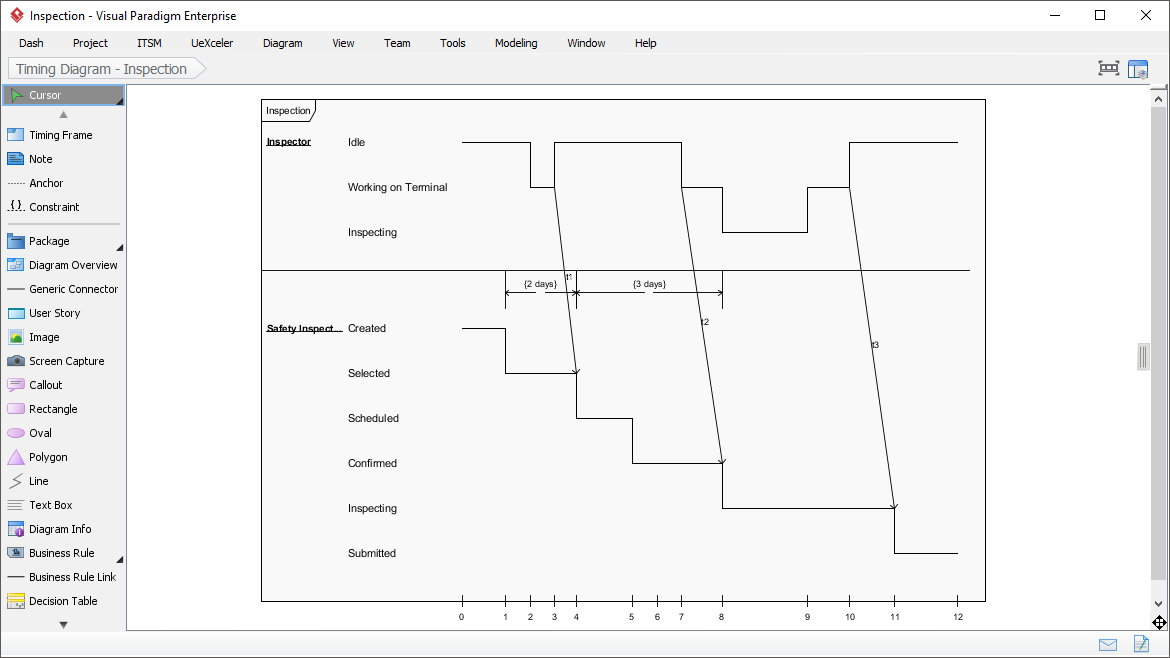
Purpose: Model precise timing constraints and state durations
Key Elements: Timelines (horizontal), state/value changes, duration constraints
Visual Paradigm Advantage:
Drag time units to adjust constraints interactively
Validate timing requirements against real-time system specs
Export timing specifications for embedded development tools
Agile methodologies emphasize adaptability, but that doesn't mean abandoning modeling. The key is strategic, lightweight application of UML—and Visual Paradigm is designed to support agile workflows seamlessly.
Start Simple with Visual Paradigm Online
Begin with minimalistic diagrams using the free, web-based Visual Paradigm Online. No installation required—just draw, share, and iterate in your browser.
Just-In-Time Modeling with Templates
Visual Paradigm includes agile-focused templates for user story mapping, sprint planning diagrams, and architecture decision records. Create models when they solve a concrete problem.
Collaborate in Real Time
Use Visual Paradigm's cloud workspace for real-time co-editing during sprint planning or refinement sessions. Comment, assign tasks, and track changes directly on diagrams.
Integrate with Your Agile Toolchain
Visual Paradigm integrates natively with Jira, Confluence, Azure DevOps, and GitHub. Link diagrams to user stories, embed models in wikis, and trigger model updates from CI/CD pipelines.
Iterate and Refactor with Version Control
Store Visual Paradigm projects in Git alongside your code. Use branch/tag workflows for model versions, and review diagram changes in pull requests just like code.
| Ceremony | Recommended Diagram | Visual Paradigm Workflow |
|---|---|---|
| Sprint Planning | Use Case, Activity | Link diagrams to Jira epics; export scope summaries |
| Refinement | Class, Sequence | Use code engineering to validate designs against existing code |
| Architecture Review | Component, Deployment | Generate architecture reports for stakeholder approval |
| Retrospective | Any outdated diagram | Use model comparison to identify documentation gaps |
⚠️ Avoid: Creating exhaustive upfront models. In agile, "just enough" modeling delivers maximum value with minimal overhead—and Visual Paradigm's lightweight editing experience makes this easy.
Visual Paradigm offers a unified, end-to-end platform for UML modeling—designed for individuals, teams, and enterprises. Whether you're sketching a quick idea or managing a complex system architecture, Visual Paradigm scales to your needs.
Best for: Quick diagrams, remote collaboration, education, and agile teams getting started with UML.
Key Features:
✅ Intuitive drag-and-drop interface—no installation required
✅ Full support for all 14 UML 2.5.1 diagram types
✅ Real-time collaboration with team members
✅ Syntax validation and UML compliance checks
✅ Export to PNG, PDF, SVG, or embed in Confluence/Notion
✅ Free tier available forever for individuals and small teams
Get Started: Visit Visual Paradigm Online and start modeling in seconds.
Best for: Developers, students, and professionals needing advanced modeling capabilities offline.
Key Features:
✅ Full-featured desktop application for Windows, macOS, Linux
✅ Code engineering: generate code from diagrams and reverse-engineer code to diagrams (Java, C#, C++, Python, and more)
✅ Database modeling: design schemas and generate DDL scripts
✅ Requirement management: link UML elements to user stories and test cases
✅ Report generation: export professional documentation to Word, PDF, or HTML
✅ Completely free for non-commercial and educational use
Download: visual-paradigm.com/solution/freeumltool
Best for: Large teams, regulated industries, and organizations requiring advanced governance, simulation, and integration.
Key Features:
✅ Everything in Community Edition, plus:
✅ Advanced simulation: execute activity and state machine diagrams to validate logic
✅ Architecture analysis: detect dependency cycles, measure coupling/cohesion
✅ Team collaboration server: centralized model repository with access control and audit trails
✅ Enterprise integrations: Jira, Confluence, Azure DevOps, Git, Slack, and more
✅ AI-powered modeling assistance (see next section)
✅ Priority support and professional services
Learn More: visual-paradigm.com/products
| Need | Visual Paradigm Solution |
|---|---|
| Getting started quickly | Visual Paradigm Online: no install, browser-based, free tier |
| Bridging design and code | Code engineering: sync UML diagrams with source code in real time |
| Collaborating across teams | Cloud workspace with real-time editing, comments, and task assignment |
| Maintaining living documentation | Auto-generate reports, embed diagrams in Confluence, link to Jira |
| Ensuring quality and compliance | UML 2.5.1 validation, architecture analysis, audit trails |
| Scaling to enterprise needs | Team server, role-based access, integration with DevOps toolchain |
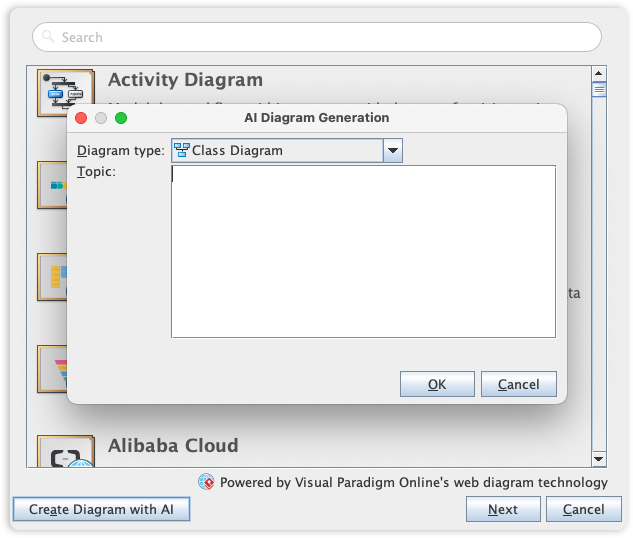
AI is transforming UML from a manual drafting exercise into an interactive design partner. Visual Paradigm leads the industry with its AI Diagram Generator, enabling you to visualize system behavior and structure with unprecedented speed.
| Capability | Example Prompt | Output |
|---|---|---|
| Text-to-Diagram | "Create a sequence diagram for user login with OAuth2" | Valid UML sequence diagram with actors, messages, and alt fragments |
| Requirement Analysis | "Extract classes from this user story: As a shopper, I want to save items to a wishlist" | Class diagram with User, Wishlist, Item entities and relationships |
| Diagram Refinement | "Add error handling to this sequence diagram" | Enhanced diagram with exception paths and retry logic |
| Consistency Checking | "Validate this model against UML 2.5.1 rules" | Report of syntax/semantics issues with fix suggestions |
Powered by Visual Paradigm's AI Diagram Generator—available in Professional Edition and via chat.visual-paradigm.com
✅ AI-Powered UML excels when:
Rapid prototyping and exploring design alternatives
Collaborating with non-technical stakeholders via natural language
Managing large, complex systems with many interrelated components
Accelerating onboarding of new team members
Maintaining living documentation that evolves with the system
✅ Traditional/manual UML is still valuable when:
You need pixel-perfect control over diagram layout
Working with legacy systems requiring precise reverse engineering
Teaching UML fundamentals (learning notation manually builds deeper understanding)
Regulatory environments requiring manual audit trails
💡 Best Practice: Use Visual Paradigm AI for initial exploration and iteration, then refine manually for final deliverables. Combine the speed of AI with the precision of human expertise—all within the same platform.
Step-by-Step Guide:
Visit chat.visual-paradigm.com or open Visual Paradigm Professional
Try a prompt:
"Create a class diagram for a library management system with Book, Member, Librarian, and Loan classes. Include attributes and relationships."
Review, refine, and export the generated diagram using Visual Paradigm's intuitive editor
Iterate with follow-up prompts: "Add a method to calculate overdue fines" or "Show the sequence for checking out a book"
Link the diagram to requirements, code, or documentation using Visual Paradigm's traceability features
Learn More: AI Diagram Generator Support for 13+ Diagram Types
Effective UML modeling isn't just about diagrams—it's about creating traceable, maintainable knowledge artifacts. Visual Paradigm provides powerful referencing and documentation capabilities to keep your models connected to the broader development lifecycle.
Link diagrams to requirements: Connect use cases to Jira epics or Confluence pages directly within Visual Paradigm
Cross-reference models: Link a sequence diagram to its corresponding class diagram with one-click navigation
Annotate with rationale: Add rich-text notes explaining why a design decision was made, with embedded model references
Visual markers: Tiny reference indicators appear in diagram elements to show linked documentation at a glance
Embed diagrams in wikis: Use Visual Paradigm's Confluence plugin to embed live, interactive diagrams that update automatically
Version control your models: Store Visual Paradigm project files (.vpp) in Git alongside your code; use branch workflows for model evolution
Generate documentation automatically: Use Visual Paradigm's OpenDocs to produce professional PDF/Word/HTML reports from your models
Review diagrams in pull requests: Export diagram diffs or use Visual Paradigm's team server to comment on model changes during code review
graph LR
    A[Create Diagram in Visual Paradigm] --> B[Add Model Element Descriptions]
    B --> C[Link to External Artifacts: Jira, Confluence, Code]
    C --> D[Generate Documentation or Export for Review]
    D --> E[Update Model as Requirements Evolve]
    E --> F[Visual Paradigm Auto-Updates Linked References]
| Pitfall | Impact | How Visual Paradigm Mitigates |
|---|---|---|
| Over-modeling upfront | Wasted effort, outdated docs | Start with Visual Paradigm Online for lightweight sketches; scale to Professional only when needed |
| Treating UML as code | Rigid designs, resistance to change | Use diagrams as communication aids; Visual Paradigm's flexible editing encourages iteration |
| Ignoring stakeholder needs | Low adoption, misalignment | Share diagrams via web links; use Visual Paradigm's presentation mode for stakeholder reviews |
| Tool lock-in | Migration headaches, cost | Visual Paradigm supports XMI import/export for long-term model portability |
| Neglecting maintenance | Documentation decay | Assign diagram ownership in Visual Paradigm Teamwork Server; set review reminders |
Unified Modeling Language remains an indispensable asset for professionals navigating the complexities of modern system design. Its standardized visual syntax transcends programming languages and organizational boundaries, enabling teams to align on architecture, clarify requirements, and document decisions with precision.
While agile practices have shifted emphasis away from exhaustive upfront modeling, the strategic application of UML diagrams—particularly use case, class, sequence, and activity diagrams—continues to deliver measurable value in:
🔍 Reducing rework through early ambiguity resolution
💬 Improving stakeholder communication across technical/non-technical boundaries
🚀 Accelerating development cycles via clearer implementation guidance
📚 Preserving institutional knowledge as teams evolve
With Visual Paradigm, UML becomes more accessible, collaborative, and intelligent than ever:
🌐 Visual Paradigm Online lowers the barrier to entry with a free, browser-based experience
💻 Community Edition provides professional-grade modeling at no cost for learners and individuals
🤖 AI Diagram Generator accelerates the transition from idea to visual model
🔗 Enterprise integrations keep models connected to your entire development toolchain
Whether you sketch a quick diagram on a whiteboard or build a comprehensive model repository, the core benefit remains: UML helps you think clearly about structure, behavior, and interaction before code is written—and Visual Paradigm makes that process faster, smarter, and more collaborative.
Start small: Pick one diagram type relevant to your current challenge; try Visual Paradigm Online for instant access
Experiment: Download Visual Paradigm Community Edition to explore code engineering and advanced features—free forever
Collaborate: Share your model via a web link and invite colleagues to comment or co-edit in real time
Iterate: Revisit and update diagrams as your system evolves; use Visual Paradigm's version control integration
Explore AI: Test the AI Diagram Generator at chat.visual-paradigm.com for rapid prototyping
In a world where software complexity only grows, mastering this visual language isn't just helpful—it's a strategic advantage that pays dividends across your entire career. And with Visual Paradigm as your modeling partner, you're equipped to lead that future.
OMG UML 2.5.1 Specification – Official standard documentation
ISO/IEC 19501:2005 – International UML standard
Visual Paradigm Community Edition – Free desktop modeling tool with full UML support
Visual Paradigm Online – Free web-based UML tool for quick diagrams and collaboration
Integrating UML into Agile Development with Visual Paradigm – Practical strategies for Scrum/Kanban teams
AI Diagram Generator Documentation – Current capabilities and usage guide
Visual Paradigm Learning Resources – Tutorials, webinars, and certification paths
Visual Paradigm Community Forum – Connect with experts and get answers
📚 Recommended Reading: "Applying UML and Patterns" by Craig Larman – A timeless guide to iterative, agile-friendly modeling practices. Pair with Visual Paradigm for hands-on learning.

