Orchestrating Automation: The Complete Guide to BPMN Service Tasks
In the modern digital enterprise, business processes are rarely purely human endeavors. They are intricate dances between people and systems, where automated actions drive efficiency, accuracy, and speed. Within the Business Process Model and Notation (BPMN) standard, the Service Task is the primary mechanism for modeling these automated interactions.
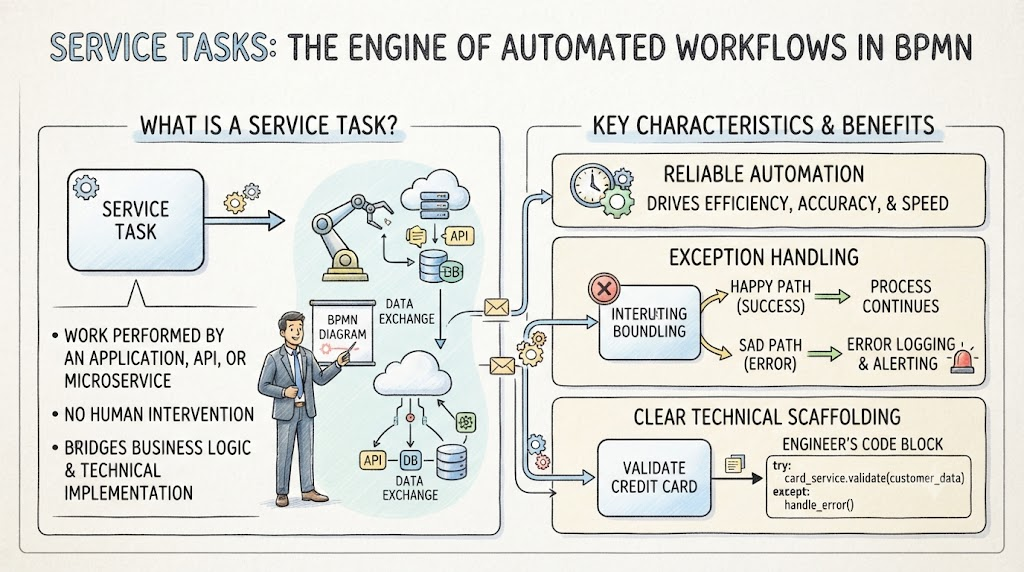
Unlike manual tasks that require human intervention, a Service Task represents work performed entirely by an application, web service, API, or micro-service. It serves as the critical bridge between high-level business logic and low-level technical implementation. Whether it’s validating a credit card, querying a database, or triggering a robotic arm in a warehouse, the Service Task provides a standardized way to visualize, analyze, and implement automated steps in your process architecture.
This guide explores the anatomy, behavior, and best practices of BPMN Service Tasks, offering practical examples and engineering insights to help you model robust, automated workflows.
1. Anatomy of a Service Task
To effectively use Service Tasks, you must first recognize them and understand their core components.
Visual Identification
Shape: A standard rounded rectangle (like all BPMN tasks).
Icon: A gear icon ⚙️ located in the upper-left corner of the task box. This distinguishes it from Manual Tasks (hand icon), User Tasks (user icon), or Script Tasks (script icon).
Functional Definition
A Service Task is not just a placeholder; it is an operation invocation. For a Service Task to execute:
It must be triggered by an incoming flow.
The data entering the task must have a specific item definition (data structure) that the underlying service understands.
It performs an automated action and typically returns a result or status.
2. How Service Tasks Work: The Technical Bridge
Service Tasks function as the connection point between the abstract business process and the concrete technical implementation.
The Request/Response Pattern
Most Service Tasks follow a synchronous request/response pattern:
Input: The process sends a request with specific parameters (e.g., CustomerID, OrderAmount).
Processing: The external system (API, Micro-service) processes the request.
Output: The system returns a response (e.g., ApprovalStatus: True, Error: InsufficientFunds).
Code Scaffolding for Engineers
From an engineering perspective, a modeled Service Task provides the "scaffolding" for development. It tells developers:
What needs to be called (the service endpoint).
When it should be called (the trigger in the process).
What constitutes success (the happy path).
What constitutes failure (error scenarios).
This clarity allows engineers to build precise error-handling logic, such as try/except blocks in Python or try/catch in Java, ensuring that the code aligns perfectly with the business process design.
3. Error Handling and Exception Flows
One of the most powerful features of Service Tasks is their ability to manage faults gracefully. Automated systems fail—networks drop, APIs timeout, and data validates incorrectly. BPMN provides structured ways to handle these scenarios.
Interrupting Error Events
If a Service Task encounters a business logic error or a technical fault, it can trigger an Interrupting Error Event.
Normal Flow: The process continues along the standard path.
Exception Flow: If an error occurs, the process diverts to a separate path designed to handle the exception (e.g., logging the error, notifying an admin, or retrying the operation).
Common Failure Scenarios to Model
Timeouts: The service does not respond within a specified time.
Validation Errors: Input data does not meet the service’s requirements.
Authentication Failures: The process lacks permission to access the service.
System Unavailability: The target service is down.
4. Practical Examples of Service Tasks
Service Tasks are versatile and can be applied across various industries and functions. Here are detailed examples:
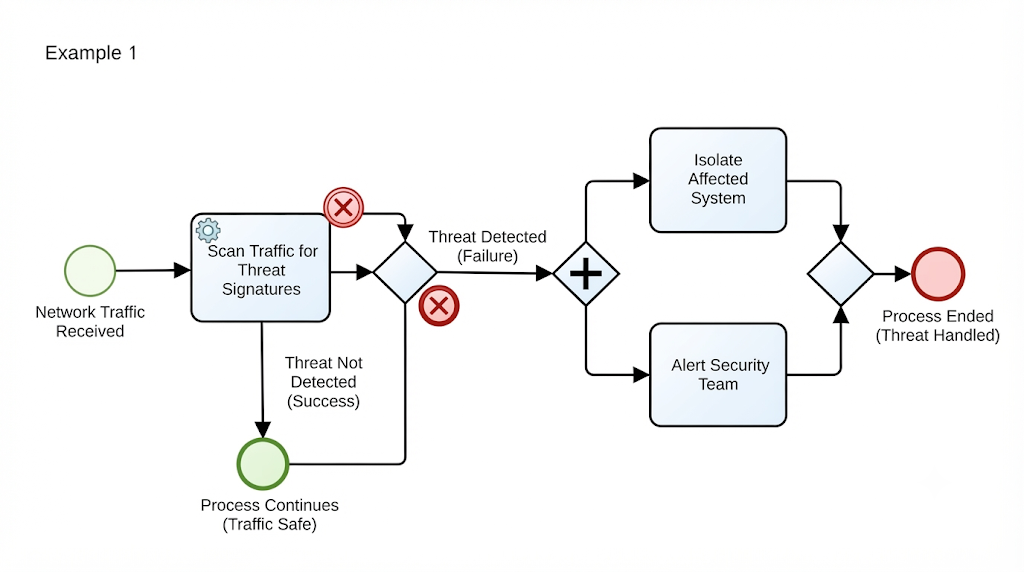
Example 1: Cybersecurity Monitoring
Context: An IT security process.
Service Task Action: Automatically scans network traffic for known threat signatures.
Outcome:
Success: No threats found; process continues.
Failure: Threat detected; triggers an interrupting error event that isolates the affected system and alerts the security team.
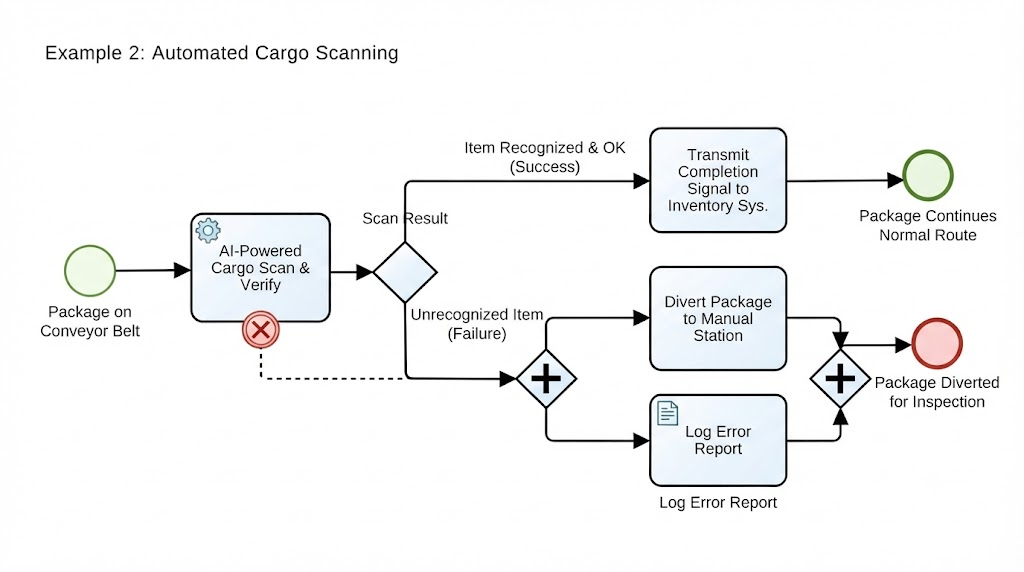
Example 2: Automated Cargo Scanning
Context: A logistics and supply chain process.
Service Task Action: Uses AI-powered cameras and sensors to identify items on a conveyor belt, verify weight, and check for damage.
Outcome: Transmits a completion signal to the inventory management system. If an item is unrecognized, it triggers a diverter to send the package to a manual inspection station.
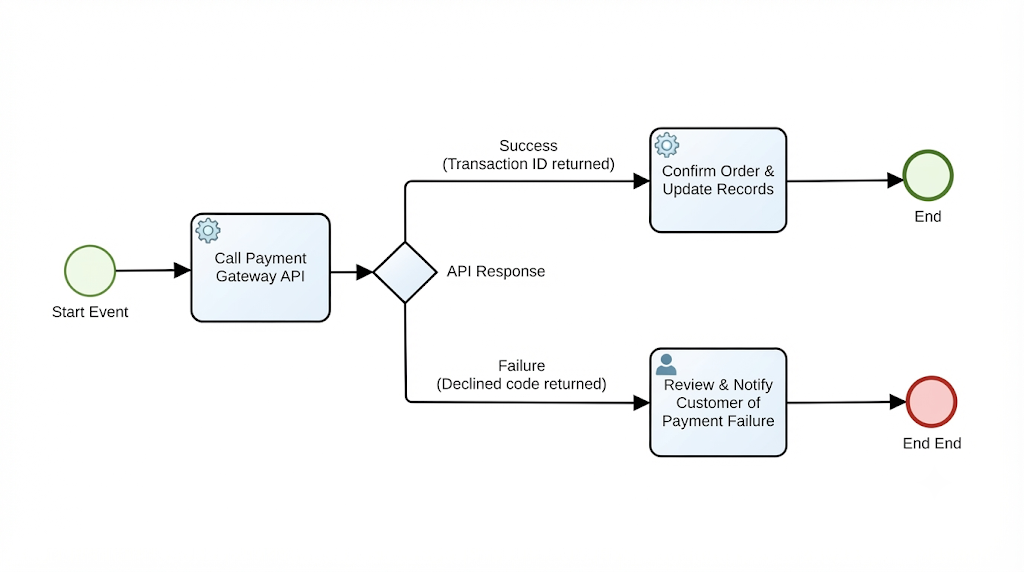
Example 3: Financial Transaction Processing
Context: An e-commerce checkout process.
Service Task Action: Calls a payment gateway API to charge the customer’s credit card.
Outcome:
Success: Returns a transaction ID; order is confirmed.
Failure: Returns a "Declined" code; process routes to a "Payment Failed" notification task.
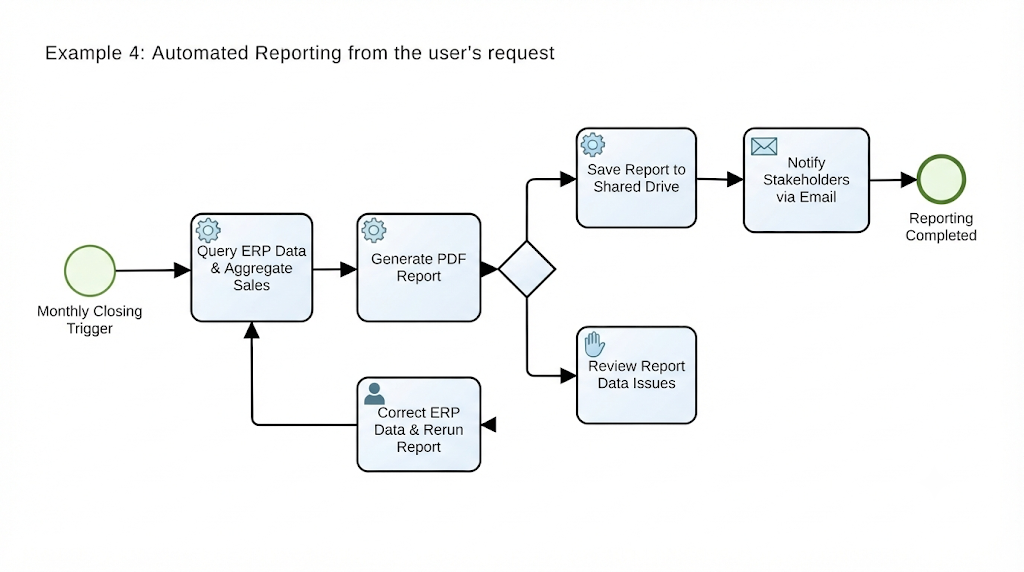
Example 4: Automated Reporting
Context: Monthly financial closing.
Service Task Action: Queries the ERP database, aggregates sales data, and generates a PDF report.
Outcome: Saves the report to a shared drive and triggers an email task to notify stakeholders.
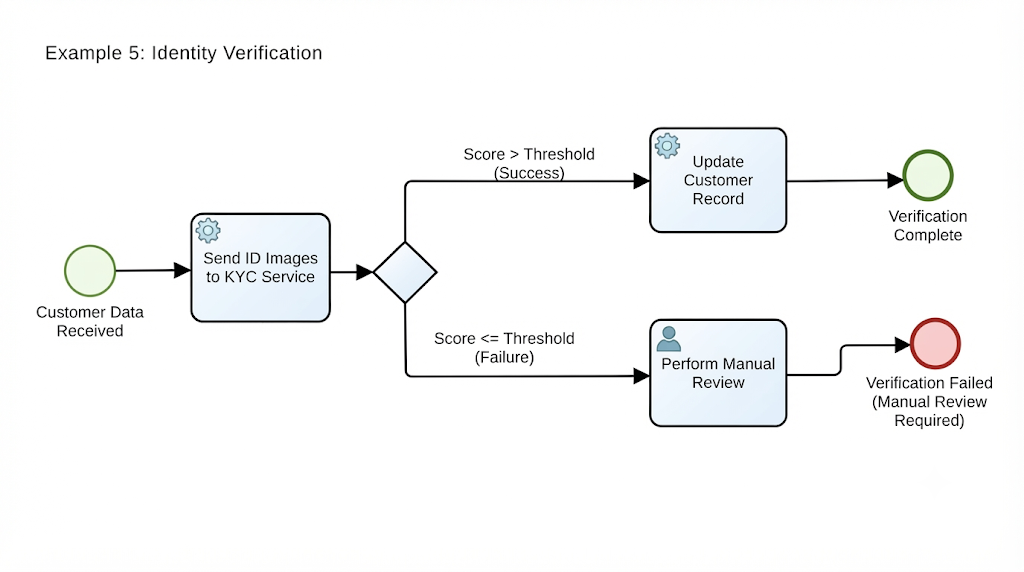
Example 5: Identity Verification
Context: Customer onboarding.
Service Task Action: Sends customer-provided ID images to a third-party KYC (Know Your Customer) service.
Outcome: Returns a verification score. If the score is below a threshold, the process routes to a manual review task.
5. Guidelines and Best Practices
To ensure your Service Tasks are effective and maintainable, follow these guidelines:
1. Keep It Atomic
Each Service Task should represent a single, distinct operation. Avoid modeling complex multi-step processes within a single Service Task. If a service performs multiple logical actions, consider breaking it down into multiple Service Tasks or using a Sub-Process.
2. Define Clear Inputs and Outputs
Document the data structure required by the service. What parameters are needed? What format is the response? This clarity helps both process analysts and developers.
3. Model Both Happy and Sad Paths
Never assume a service will always succeed. Always model the error paths using Boundary Error Events or Exception Flows. This ensures your process is resilient.
4. Use Descriptive Names
Name the task based on the action performed, not the system name.
Bad: "Call SAP API"
Good: "Validate Customer Credit Limit"
5. Consider Asynchronous Operations
If a service takes a long time to respond (e.g., generating a complex report), consider using an asynchronous pattern with a Receive Task or a Message Event, rather than blocking the process with a synchronous Service Task.
6. Tips and Tricks
Leverage Service Catalogs: If your organization has a service catalog, reference specific service IDs in your BPMN models to ensure alignment with IT governance.
Mock Services for Testing: When designing processes, use mock services to simulate responses. This allows you to test error handling and edge cases without relying on live systems.
Monitor Performance: Use process mining tools to track the duration of Service Tasks. If a particular service task consistently causes delays, it may indicate a need for optimization or caching.
Document Dependencies: Clearly document which external systems each Service Task depends on. This is crucial for impact analysis when systems undergo maintenance or changes.
Security First: Ensure that sensitive data passed to Service Tasks is encrypted and that the process has the necessary authentication credentials managed securely (e.g., via vaults, not hardcoded).
Conclusion
Service Tasks are the engine room of modern BPMN diagrams. They transform static process maps into dynamic blueprints for automation, enabling organizations to leverage the power of APIs, micro-services, and intelligent systems. By understanding their visual cues, operational patterns, and error-handling capabilities, you can design processes that are not only efficient but also resilient and robust.
Whether you are automating a simple email notification or orchestrating a complex cybersecurity response, the Service Task provides the structure needed to bridge the gap between business intent and technical execution. Mastering this element is essential for any product manager, business analyst, or process architect looking to drive digital transformation.
Turn every software project into a successful one.